jQuery Validation verifies the validity of client-side user entries (in the browser). This has two purposes:
- Avoid unnecessary round trips between the client and the server when the data is invalid
- Improve the user experience by providing immediate visual feedback when the user enters data
jQuery Unobtrusive Validation automatically creates validation rules based on data-val-* attributes:
HTML
<input class="form-control"
    data-val="true"
    data-val-length="The field Name must be a string with a maximum length of 256."
    data-val-length-max="256"
    data-val-required="The Name field is required.">
These attributes are generated automatically by ASP.NET MVC based on data annotations (RequiredAttribute, LengthAttribute, EmailAttribute, etc.). The above HTML is generated from the following code:
C#
[System.ComponentModel.DataAnnotations.StringLengthAttribute(256)]
[System.ComponentModel.DataAnnotations.RequiredAttribute()]
public string Name { get;  set ; }
Razor
<div class="form-group">
    @Html.LabelForBootstrap(model => model.Name)
    @Html.EditorForBootstrap(model => model.Name)
    @Html.ValidationMessageForBootstrap(model => model.Name)
</div>
When the user forgets to enter a value, the validation rule invalidates the field and displays an error message:
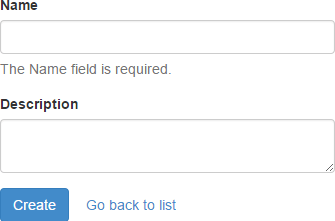
This works, but it is not very visually appealing. Bootstrap lets you highlight invalid fields in red by adding the has-error class to the form-group container. You can also add a glyph icon (a cross for errors) to make the feedback more prominent:
HTML
<div class="form-group has-error has-feedback">
    <label class="control-label" for="Name">Name</label>
    <input class="form-controlinput-validation-error" data-val="true">
    <span class="glyphicon glyphicon-remove form-control-feedback"></span><span class="glyphicon glyphicon-remove form-control-feedback"></span>
    <span class="help-block field-validation-error" data-valmsg-for="Name" data-valmsg-replace="true"><span id="Name-error" class="">The Name field is required.</span></span>
</div>

jQuery Validation lets you override the default behavior when validating a field using the $.validator.setDefaults method:
JavaScript
$.validator.setDefaults({
    ignore: [':hidden'], /* Ignore hidden fields */
    errorClass: "input-validation-error",
    // On Validation Error
    highlight: function (element, errorClass) {
        var $element = $(element);
        $element.addClass(errorClass);
        $element.closest('.form-group').addClass('has-error has-feedback');
        $('<span class="glyphicon glyphicon-remove form-control-feedback"></span>').insertAfter($element);
    },
    // On Validation Success
    unhighlight: function (element, errorClass) {
        var $element = $(element);
        $element.removeClass(errorClass);
        $element.closest('.form-group').removeClass('has-error has-feedback');
        var next = $element.next();
        if (next && next.hasClass('form-control-feedback')) {
            next.remove();
        }
    }
});
With just a few lines of JavaScript, you can integrate jQuery Validation with Bootstrap. To go further, you could also add the has-success class and its associated glyph when a field is valid.
Do you have a question or a suggestion about this post? Contact me!
