Windows 8 introduced toast notifications, which are a convenient way to display informational messages when events occur in your application.
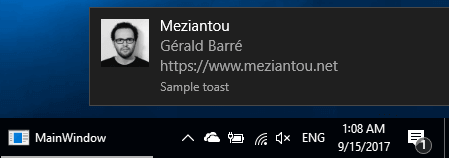 Windows Toast Notification
However, this feature is only available through the UWP API, which is not accessible in WPF applications by default. With a small trick, you can gain access to it.
Edit the csproj to add <TargetPlatformVersion>8.0</TargetPlatformVersion>
csproj (MSBuild project file)
<PropertyGroup>
    <OutputType>WinExe</OutputType>
    <TargetPlatformVersion>8.0</TargetPlatformVersion>
    ...
</PropertyGroup>
Add a reference to Windows
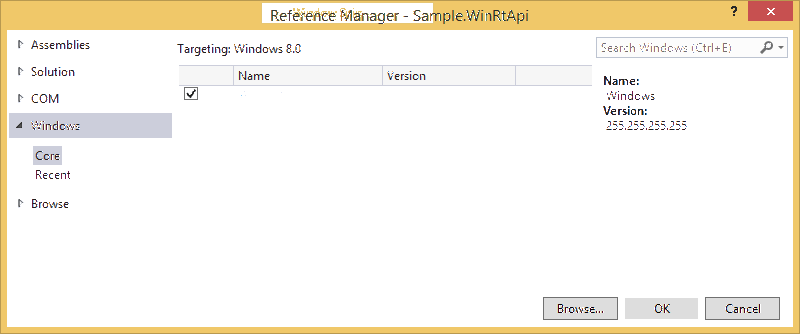 Add reference
Or add the reference in the csproj:
csproj (MSBuild project file)
<ItemGroup>
    <Reference Include="System" />
    // ...
    <Reference Include="Windows" />
</ItemGroup>
Create a toast
To create a toast, build an XML document describing its content using one of the predefined templates. You can find all available templates in the MSDN documentation: The toast template catalog (Windows Runtime apps)
The following code displays a simple toast with text only:
C#
var message = "Sample message";
var xml = $"<?xml version=\"1.0\"?><toast><visual><binding template=\"ToastText01\"><text id=\"1\">{message}</text></binding></visual></toast>";
var toastXml  = new XmlDocument();
toastXml.LoadXml(xml);
var toast = new ToastNotification(toastXml);
ToastNotificationManager.CreateToastNotifier("Sample toast").Show(toast);
The following code displays a toast with an image and 3 lines of text:
C#
var xml = @"<toast>
    <visual>
        <binding template=""ToastImageAndText04"">
            <image id=""1"" src=""file:///C:\meziantou.jpeg"" alt=""meziantou""/>
            <text id=""1"">Meziantou</text>
            <text id=""2"">Gérald Barré</text>
            <text id=""3"">https://www.meziantou.net</text>
        </binding>
    </visual>
</toast>";
var toastXml  = new XmlDocument();
toastXml.LoadXml(xml);
var toast = new ToastNotification(toastXml);
ToastNotificationManager.CreateToastNotifier("Sample toast").Show(toast);
You can now display toast notifications to your users.
Do you have a question or a suggestion about this post? Contact me!
