After the previous posts about TypeScript, you may be ready to migrate your application from JavaScript to TypeScript. If you haven't read them yet, take a few minutes to do so:
Migrating from JavaScript to TypeScript is not overly complicated, but there are a few steps to follow to do it correctly without spending too much time.
#Learn the TypeScript language
First, you need to learn the language. If you are already a JavaScript developer, picking up TypeScript is straightforward.
Here are a few good links:
You'll also find useful resources on this blog 😃
#Install TypeScript
If you are using Visual Studio, the TypeScript compiler is already installed. Otherwise, you must install it.
Shell
npm install typescript
.\node_modules\.bin\tsc --version
or you can install it globally
Shell
npm install -g typescript
tsc --version
#Add the TypeScript configuration file to your project
The configuration file tells the TypeScript compiler which options to use when compiling the project. It also marks the root of the TypeScript project.
Your solution should look like:
Root
├── src
│   ├── file1.js
│   └── file2.js
├── built
└── tsconfig.json
The tsconfig.json at the root of the project contains:
JSON
{
  "compilerOptions": {
    "target": "es5",
    "allowJs": true,
    "outDir": "./built"
  },
  "include": [
      "./src/**/*"
  ]
}
This file tells the TypeScript compiler to accept JavaScript files, allowing you to migrate files one by one rather than converting everything at once. The outDir specifies where TypeScript outputs files after compilation. The include option specifies where the source files are located.
By default, the compiler does not report errors in JS files. You can start gaining some TypeScript benefits by telling the compiler to check your JS files using "checkJs": true:
JSON
{
  "compilerOptions": {
    "target": "es5",
    "allowJs": true,
    "checkJs": true,
    "outDir": "./built"
  },
  "include": [
      "./src/**/*"
  ]
}
The compiler will use the information it can gather from your files to report errors (documentation). For instance, it can use JSDoc to infer types or resolve require("...") statements. So you'll get some TypeScript advantages immediately. You can also set compiler options such as noImplicitReturns: true, noFallthroughCasesInSwitch: false, allowUnreachableCode: false, or allowUnusedLabels: false.
JavaScript
/** @type {string} */
var author;

author = "meziantou"; // OK
author = false;       // Error: boolean is not assignable to string
#Convert files to TypeScript and fix common errors
It's time to start using TypeScript. The only change required is renaming files from .js to .ts. You don't need to migrate all files at once; you can convert them one by one. If you have a large codebase, you may encounter hundreds of errors, so converting incrementally makes them much easier to handle.
Some valid JavaScript will stop working in TypeScript, mainly because of the type checker. Here are a few errors you may encounter.
##Sequentially Added Properties
The following code is very common in JavaScript:
TypeScript
var author = {};
author.nickname = "Meziantou";
author.fullName = "Gérald Barré";
In TypeScript, the type of author is inferred as an empty object, so nickname and fullName don't exist on it and cannot be assigned. One solution is to inline the properties at the point of object creation:
TypeScript
var author = {
    nickname = "Meziantou",
    fullName = "Gérald Barré"
};
The other solution is to create a type for the author variable, so the compiler knows the list of properties available.
TypeScript
interface Author { nickname: string; fullName: string }

var author = {} as Author;
author.nickname = "Meziantou";
author.fullName = "Gérald Barré";
The last option, which is not ideal, is to tell the compiler to skip type-checking on the author variable by using the type any:
TypeScript
var author: any = {};
author.nickname = "Meziantou";
author.fullName = "Gérald Barré";
##Using a well-known library
TypeScript must know the types of every object in order to compile a file. If you are using a library such as jQuery, Lodash, etc., you need to provide TypeScript with its type definitions. Fortunately, definitions for thousands of libraries are available via npm. For instance, to add jQuery types:
Shell
npm install @types/jquery
You'll find the complete list of supported libraries on npm: https://www.npmjs.com/~types
##Using other libraries
If types are not available, you have two options:
- Create the definition of the methods/objects
- Create a dummy declaration
For instance, if you use a library that exposes a function add(a, b) and an object _, you can create the following dummy declarations so the compiler is satisfied. The any type tells the compiler to skip type-checking for those values.
TypeScript
declare function add(...args: any[]): any;
declare var _: any;

add(1, 2);
_.filter(characters, { 'age': 36 });
With these definitions, anything after _ will be valid. While this is not the philosophy of TypeScript, it's better to have 80% of the code checked instead of 0%. So, it's a good start. Later, you can write a better definition such as:
TypeScript
declare function add(a: number, b: number): number;
declare var _: Underscore;

interface Underscore {
    filter(obj: any[], filter: { [name: string]: any });
}
##External modules (require, define)
If you are using modules with commonjs, requirejs or amd, you can use a dummy declaration:
TypeScript
declare function require(path: string): any;
declare function define(...args: any[]): any;
However, you should prefer the TypeScript module syntax, which is more convenient and provides full typing information. First, change the module option in the tsconfig.json file:
JSON
{
  "compilerOptions": {
    "module": "commonjs" // Set the kind of module you are using
  }
}
Then change your import statements:
TypeScript
// JavaScript
var math = require("./math");

// TypeScript (one of the following)
import math = require("./math");
math.add(1, 2);

import { add } from "./math";
add(1, 2);
You can also replace the exports with the new syntax:
TypeScript
// JavaScript
module.exports.add = function(a, b) {
    return a + b;
}

// TypeScript
export function add(a, b) {
    return a + b;
}
#Use new syntaxes
You now have a valid TypeScript project and can start using new language features to write cleaner, more readable code. For instance, you can:
- Replace immediately-invoked function expressions with namespace/module
- Use classes when possible
- Replace
var with let or const - Replace magic numbers/strings with enumeration
- Replace
require() with import (check the previous section) - Use
async await to simplify the usage of asynchronous code - Replace property names with nameof equivalent
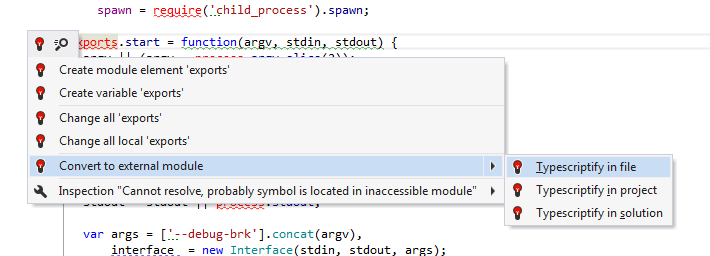
Some tools such as Resharper allow you to replace common JS syntax with a TypeScript equivalent: https://blog.jetbrains.com/dotnet/2015/02/05/ways-and-advantages-of-migrating-javascript-code-to-typescript/
#Enable compiler checks to find more errors
Finally, gradually enable stricter compiler options to catch more errors at compile time. Some options such as strictNullChecks can generate many errors (potentially thousands), so enable them one by one and fix each batch of new errors. You can see how the VS Code team handled this in this issue.
JSON
{
    "compilerOptions": {
        "allowUnreachableCode": false,
        "allowUnusedLabels": false,
        "alwaysStrict": true,
        "noImplicitAny": true,
        "noImplicitReturns": true,
        "noImplicitThis": true,
        "noFallthroughCasesInSwitch": true,
        "noUnusedLocals": true,
        "noUnusedParameters": true,
        "suppressExcessPropertyErrors": false,
        "suppressImplicitAnyIndexErrors": false,
        "strictFunctionTypes": true,
        "strictNullChecks": true,
        "strictPropertyInitialization": true,
        "checkJs": true // If you are still using some js files
    }
}
You can read more about all these options in a previous post: Detect common JavaScript errors with TypeScript.
Do you have a question or a suggestion about this post? Contact me!
