This post is part of the series 'MSTest v2'. Be sure to check out the rest of the blog posts of the series!
MSTest v2 is extensible. In a previous post, we saw how to extend data tests. In this post, we'll see how to create new asserts.
The MSTest framework contains lots of assert methods. They are all located in 3 classes: Assert, StringAssert, and CollectionAssert. Sometimes you need more assertions. In that case, you can create your own assert methods.
An assert method validates that a value satisfies specific criteria. If the criteria are not met, an exception is thrown. In MSTest, the exception is of type AssertFailedException, but you can throw any type of exception.
Let's create a custom assert to verify that two strings are equal. If the strings differ, the message includes a formatted diff that highlights whitespace characters and the first differing character:
C#
internal static class MyAssert
{
    public static void StringEquals(string expected, string actual)
    {
        if (expected == actual)
            return;

        throw new AssertFailedException(GetMessage(expected, actual));
    }

    private static string GetMessage(string expected, string actual)
    {
        var expectedFormat = ReplaceInvisibleCharacters(expected);
        var actualFormat = ReplaceInvisibleCharacters(actual);

        // Get the index of the first different character
        var index = expectedFormat.Zip(actualFormat, (c1, c2) => c1 == c2).TakeWhile(b => b).Count();
        var caret = new string(' ', index) + "^";

        return $@"Strings are different.
Expect: <{expectedFormat}>
Actual: <{actualFormat}>
         {caret}";
    }

    private static string ReplaceInvisibleCharacters(string value)
    {
        return value
            .Replace(' ', '·')
            .Replace('\t', '→')
            .Replace("\r", "\\r")
            .Replace("\n", "\\n");
    }
}
In case the values are different, the output of the test run looks like:
C#
[TestMethod]
public void Test1()
{
    MyAssert.StringEquals("abc def", "abc  def");
}
Message: Strings are different.
Expect: <abc·def>
Actual: <abc··def>
             ^
That works well. But MSTest v2 also provides a way to integrate your asserts with the built-in assert classes. If you look at the IntelliSense, you may have noticed the That property, which has no members:
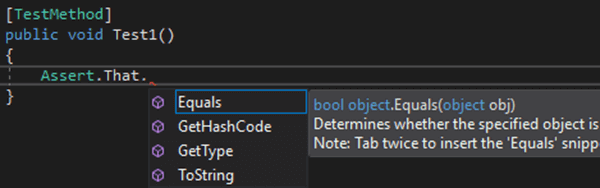
The purpose of this property is to return an instance of Assert, which allows you to attach extension methods to it. This makes it possible to extend the built-in asserts seamlessly. The same property exists on StringAssert and CollectionAssert.
So, you can rewrite the assert method as an extension method:
C#
internal static class MyAssert
{
    public static void StringEquals(this Assert assert, string expected, string actual)
    {
        if (expected == actual)
            return;

        throw new AssertFailedException(GetMessage(expected, actual));
    }

    // ...
}
Now, you can use the extension method in the test:
C#
[TestMethod]
public void Test1()
{
    Assert.That.StringEquals("abc def", "abc  def");
}
This syntax is more readable, as the line reads like a natural English sentence.
#Conclusion
Writing custom assert methods lets you produce more informative failure messages and create domain-specific assertions. MSTest v2 provides a clean way to integrate custom asserts via extension methods and the That property.
Do you have a question or a suggestion about this post? Contact me!
