This post is part of the series 'Strings in .NET'. Be sure to check out the rest of the blog posts of the series!
Comparing strings is not as straightforward as comparing numbers. For numbers, equality is usually simple: values either match or they do not (except for edge cases such as +0, -0, NaN, +∞, -∞ and floating point precision issues 😉). Strings add more dimensions. Should the comparison be case-sensitive? Should different representations of the same character be treated as equal? For example, the letter ß is used in German, but it can also be written as ss, which is easier to type on many keyboards.
#Comparison modes
In .NET there are 6 ways to compare strings:
It is important to explicitly specify the comparison mode to avoid unexpected behavior or even security issues. For example, comparing two usernames using the current culture or invariant culture could produce a false equality.
#Examples
The difference between Ordinal and OrdinalIgnoreCase is straightforward. Understanding what a culture-specific comparison means is less obvious. Here are some examples demonstrating the differences depending on the comparison mode used.
Let's start with some basic comparisons using Ordinal and OrdinalIgnoreCase:
C#
// Basic comparisons
string.Equals("a", "a", StringComparison.Ordinal);           // true
string.Equals("a", "A", StringComparison.Ordinal);           // false
string.Equals("a", "a", StringComparison.OrdinalIgnoreCase); // true
string.Equals("a", "A", StringComparison.OrdinalIgnoreCase); // true
Now let's try a non-obvious character. The German character ß (Eszett) can also be written ss, so they can be considered equivalent, as shown in the following examples:
C#
string.Equals("ss", "ß", StringComparison.OrdinalIgnoreCase);          // false
string.Equals("ss", "ß", StringComparison.InvariantCulture);           // true on Windows / false on Linux (WSL)
string.Equals("ss", "ß", StringComparison.InvariantCultureIgnoreCase); // true on Windows / false on Linux (WSL)
Similar differences may apply to ligatures:
C#
string.Contains("encyclopædia", "ae", StringComparison.Ordinal);          // false
string.Contains("encyclopædia", "ae", StringComparison.InvariantCulture); // true
Another tricky character is i in the Turkish language. In Latin languages, there is typically only one i. In Turkish, there are two: the dotless ı and the dotted i. There are also two different uppercase characters: I and İ. You can find more details in the following resources:
C#
Console.WriteLine(string.Equals("ı", "I", StringComparison.OrdinalIgnoreCase)); // false
Console.WriteLine(string.Equals("ı", "İ", StringComparison.OrdinalIgnoreCase)); // false
Console.WriteLine(string.Equals("i", "I", StringComparison.OrdinalIgnoreCase)); // true
Console.WriteLine(string.Equals("i", "İ", StringComparison.OrdinalIgnoreCase)); // false

CultureInfo.CurrentCulture = new CultureInfo("en-US");
string.Equals("i", "I", StringComparison.CurrentCultureIgnoreCase); // true
string.Equals("i", "İ", StringComparison.CurrentCultureIgnoreCase); // false

CultureInfo.CurrentCulture = new CultureInfo("tr-TR");
string.Equals("i", "I", StringComparison.CurrentCultureIgnoreCase); // false
string.Equals("i", "İ", StringComparison.CurrentCultureIgnoreCase); // true
In my opinion, the Thai culture presents some of the most unusual comparison behaviors. It does not use the dot symbol (.) in the same way, leading to unexpected comparison results!
C#
// The Thai culture doesn't use '.', so comparisons can be unexpected (tested on Ubuntu 18.04):
CultureInfo.CurrentCulture = new CultureInfo("th_TH.UTF8");
"Test".StartsWith(".", StringComparison.CurrentCulture); // true!!!
"12.4".IndexOf(".", StringComparison.CurrentCulture);    // 0
The dot behavior is interesting, but let's look at numbers. When comparing numbers, Thai digits are converted to Arabic digits (0 to 9 in Thai: ๐ ๑ ๒ ๓ ๔ ๕ ๖ ๗ ๘ ๙) as explained in the Unicode documentation
C#
CultureInfo.CurrentCulture = new CultureInfo("th_TH.UTF8");
string.Equals("1", "๑", StringComparison.CurrentCulture);             // true
string.Equals("1", "๑", StringComparison.InvariantCultureIgnoreCase); // false
\0 and a few other characters are ignored in linguistic comparisons:
C#
string.Equals("a\0b", "ab", StringComparison.Ordinal);          // false
string.Equals("a\0b", "ab", StringComparison.InvariantCulture); // true
string.Equals("a\0b", "ab", StringComparison.CurrentCulture);   // true

string.Equals("A꙰B", "AB", StringComparison.Ordinal);          // false
string.Equals("A꙰B", "AB", StringComparison.InvariantCulture); // true
String normalization can also affect the results of ordinal versus non-ordinal comparisons. In the following example, the first string contains only one character: é. The second contains two characters: e and \u0301 (Combining Acute Accent). The second string is the normalization in form D of the first string.
C#
"é".Normalize(System.Text.NormalizationForm.FormD); // e\u0301

string.Equals("é", "e\u0301", StringComparison.Ordinal);          // false
string.Equals("é", "e\u0301", StringComparison.InvariantCulture); // true
string.Equals("é", "e\u0301", StringComparison.CurrentCulture);   // true
Culture-sensitive comparison operates on grapheme clusters. For instance, the string A\r\nB is split into A, \r\n, and B. This means that \n is not found as a distinct element because it is part of the \r\n grapheme cluster. However, \r and \r\n are still found within the string.
C#
"A\r\nB".Contains("\n",   StringComparison.Ordinal);          // True
"A\r\nB".Contains("\n",   StringComparison.InvariantCulture); // False
"A\r\nB".Contains("\r\n", StringComparison.InvariantCulture); // True
"A\r\nB".Contains("\r",   StringComparison.InvariantCulture); // True

// Similar issue
CultureInfo.CurrentCulture = CultureInfo.GetCultureInfo("en-US");
"\n\r\nTest".IndexOf("\nTest",  StringComparison.CurrentCulture); // -1
"\n\r\nTest".Contains("\nTest", StringComparison.CurrentCulture); // False
The same applies to other cultures. For example, in Hungarian dz is considered a single letter:
C#
CultureInfo.CurrentCulture = CultureInfo.GetCultureInfo("hu-HU");
"endz".Contains("z", StringComparison.CurrentCulture);  // False
"endz".Contains("d", StringComparison.CurrentCulture);  // False
"endz".Contains("dz", StringComparison.CurrentCulture); // True
   "d".Contains("d", StringComparison.CurrentCulture);  // True
   "z".Contains("z", StringComparison.CurrentCulture);  // True
I hope you now understand how important it is to specify the way you want to compare strings.
##string.Equals with CurrentCulture vs ToUpper/ToLower and ==
Comparing strings using ToUpper or ToLower combined with == is not equivalent to using StringComparison.CurrentCultureIgnoreCase. The ToUpper and ToLower methods use the current culture to change the case, then == performs an ordinal comparison. Using StringComparison.CurrentCultureIgnoreCase applies linguistic-comparison rules. Here's an example that shows the difference:
C#
var a = "a\0b";
var b = "ab";

Console.WriteLine(a.ToUpper() == b.ToUpper()); // False
Console.WriteLine(string.Equals(a, b, StringComparison.CurrentCultureIgnoreCase)); // True
#Methods have different default comparison modes
You should always explicitly specify the comparison mode, as default values are inconsistent. For instance, string.IndexOf uses the current culture, whereas string.Equals uses Ordinal comparison. Therefore, the basic rule is to always use an overload that accepts a StringComparison, IEqualityComparer<string>, or IComparer<string> whenever possible.
C#
// Inconsistent result
"encyclopædia".Contains("ae"); // False because it uses Ordinal by default
"encyclopædie".IndexOf("ae");  // '8' because it uses the Current culture

// To get a consistent result, you must set the StringComparison argument
var stringComparison = StringComparison.Ordinal;
"encyclopædia".Contains("ae", stringComparison); // False
"encyclopædie".IndexOf("ae", stringComparison);  // -1
This also applies to Equals and CompareTo (and all the operators ==, <, >, etc.):
C#
"encyclopædia".Equals("encyclopaedia");    // False
"encyclopædia".CompareTo("encyclopaedia"); // 0 (Equals)
This inconsistency also implies that Comparer<string>.Default is culture-sensitive, whereas EqualityComparer<string>.Default uses ordinal comparison. You can observe this difference when using Dictionary<string, T> and SortedList<string, T>.
C#
// The dictionary contains two items
var dict = new Dictionary<string, int>()
{
    { "encyclopædia", 0 },
    { "encyclopaedia", 0 },
};

// System.ArgumentException: An entry with the same key already exists.
var list = new SortedList<string, int>()
{
    { "encyclopædia", 0 },
    { "encyclopaedia", 0 }, // The key is duplicated
};
#Implication of the Globalization Invariant mode in comparisons
The globalization invariant mode enables you to remove application dependencies on globalization data and globalization behavior. This mode is an opt-in feature that offers more flexibility when reducing dependencies and distribution size matters more than full globalization support.
Invariant globalization modifies the way OrdinalIgnoreCase works by limiting the string casing operation to the ASCII range only.
C#
// "𐓸" U+104F8, "𐓐" U+104D0 (both are non-ascii character)
// InvariantGlobalization = false
string.Equals("𐓸", "𐓐", StringComparison.OrdinalIgnoreCase);          // true
string.Equals("𐓸", "𐓐", StringComparison.InvariantCultureIgnoreCase); // true

// InvariantGlobalization = true
string.Equals("𐓸", "𐓐", StringComparison.OrdinalIgnoreCase);          // false
string.Equals("𐓸", "𐓐", StringComparison.InvariantCultureIgnoreCase); // false
You can detect whether the application is running in invariant mode by using the AppContext.TryGetSwitch("System.Globalization.Invariant", out bool isEnabled). This is a good approximation, but if you want to be more precise, you can use the code from this post: How to detect Globalization-Invariant mode in .NET?.
#NLS vs ICU
Previously, .NET globalization APIs relied on different underlying libraries depending on the platform. On Unix, the APIs used International Components for Unicode (ICU), and on Windows, they used National Language Support (NLS). This resulted in behavioral differences in certain globalization APIs across platforms. .NET 5.0 introduces a runtime behavioral change where globalization APIs now use ICU by default across all supported platforms. This ensures consistent behavior across all supported platforms.
Note that Windows also promotes ICU. ICU DLLs have been shipped with Windows since Windows 10 version 1703. Many applications have already started using ICU on Windows. Thus, the migration to ICU is a broader trend, not limited to .NET.
| Windows | Linux |
|---|
| .NET 1.0 - 4.8 | NLS | - |
| NET Core 1.0 - 3.1 | NLS | ICU |
| .NET 5.0 | ICU1 | ICU |
1 It's possible to force usage of NLS using a flag. If the version of Windows doesn't have ICU available, it automatically falls back to NLS.
NLS and ICU behave differently in some edge cases. Additionally, new library versions may introduce behavior changes. Starting with .NET 5.0, you can fix the version of ICU used by your application to avoid undesired changes.
C#
"a\r\nb".Contains("\n", StringComparison.InvariantCulture); // NLS: True, ICU (.NET 5): False, ICU (.NET 6): True
string.Equals("AE", "ae", StringComparison.InvariantCultureIgnoreCase); // NLS: True, ICU: False

CultureInfo.CurrentCulture = CultureInfo.GetCultureInfo("mi-NZ");
"/*".StartsWith("--", StringComparison.CurrentCulture);   // NLS: True, ICU: False
Note that switching from NLS to ICU is not considered a breaking change. Globalization data changes occur even with NLS, and this data should not be considered stable. Also, Windows is converging to CLDR, which means NLS data may change in the future.
Starting with .NET 5.0, you can ensure consistency across all deployments by using an app-local ICU. In this case, you can pin the ICU version used by your application instead of using the version provided by .NET.
#Where to specify the comparison mode
Most string manipulation methods provide a parameter to specify the comparison mode. There are two main ways: using StringComparison or IEqualityComparer<string>.
C#
// String methods
"" == ""; // Should be string.Equals("", "", StringComparison.Ordinal);
string.Equals("", "", StringComparison.Ordinal);
string.Compare("", "", StringComparison.Ordinal);
"".Contains("", StringComparison.CurrentCulture);
"".EndsWith("", StringComparison.CurrentCulture);
"".Equals("", StringComparison.Ordinal);
"".IndexOf("", StringComparison.CurrentCulture);
"".Replace("", "", StringComparison.CurrentCulture);
"".StartsWith("", StringComparison.CurrentCulture);
"".ToLower(CultureInfo.CurrentCulture);
"".ToUpper(CultureInfo.CurrentCulture);

// Enumerable extensions
new [] { "" }.Contains("", StringComparer.Ordinal);
new [] { "" }.Distinct(StringComparer.Ordinal);
new [] { "" }.GroupBy(x => x, StringComparer.Ordinal);
new [] { "" }.OrderBy(x => x, StringComparer.Ordinal);
// ...

// HashSet and Dictionary constructors
new HashSet<string>(StringComparer.Ordinal);
new Dictionary<string, object>(StringComparer.Ordinal);
new ConcurrentDictionary<string, object>(StringComparer.Ordinal);
new SortedList<string, object>(StringComparer.CurrentCulture);

// GetHashCode
"".GetHashCode(StringComparison.Ordinal); // .NET Core 2.0+
StringComparer.Ordinal.GetHashCode("");
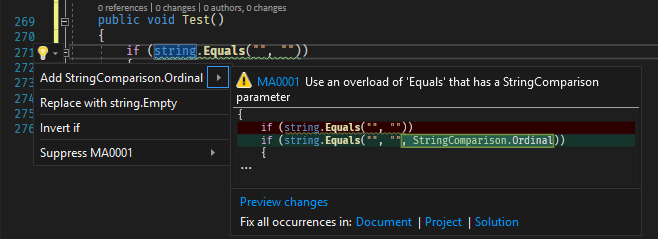
#Getting warnings in the IDE using a Roslyn Analyzer
You can check these patterns in your code using a Roslyn analyzer. The free analyzer I created includes rules for this: https://github.com/meziantou/Meziantou.Analyzer. This rule was added first because it is easy to overlook, especially for developers new to .NET globalization.
You can install the Visual Studio extension or the NuGet package to analyze your code:
#Additional resources
List of issues that report problems with comparisons:
- C# “anyString”.Contains('\0', StringComparison.InvariantCulture) returns true in .NET5 but false in older versions
- Why indexof search text not correct?
- .net 5.0 seems to be wrong in detecting zero-terminzted string
- .NET 5.0 - Non-empty string is equal to empty string
- Strange Contains and IndexOf handling of "\0" in .NET 5.0
- The result of full-width string comparison with InvariantCultureIgnoreCase has changed in .NET 5
- StringComparison.InvariantCulture behavior change between .NET Core 3.1 and .NET 5
- CompareInfo.LastIndexOf does not handle zero-weight sequences correctly on ICU
- SortedDictionary Behaves Differently Across .NET Core Platforms
- Breaking change with string.IndexOf(string) from .NET Core 3.0 -> .NET 5.0
- \u007F is ignored for non-Ordinal comparisons in StartsWith, EndsWith and Contains on Linux and Mac but not Windows
- String.CompareTo Behaviour different between WIN10 & Linux
- InvariantCulture string comparison is inconsistent between Windows and macOS
- CompareInfo.IndexOf() returns different values on Linux and Windows
- Same culture behaves inconsistently across Windows and Linux
- String.IndexOf and String.LastIndexOf do not behave consistently across OS platforms
- string.StartsWith("–") returns true for "/*" in case of mi and mi-NZ culture
- .NET 5 RC1 breaks string CompareTo,
- IndexOf result
- String.IndexOf("\0") returns always 0 in .NET 5.0
- NET5.0 vs NETCore3.1 - Strings comparison between space and non-breaking-space characters
- String.IndexOf("\0") Zero
- Fix the string search behavior when using ICU
- string.IndexOf() incorrect return value for full stop for Thai culture
- String.IndexOf("'") returns incorrect value in Thai culture
- String.EndsWith("\0") behavior difference between .NET7 and .NET Framework
- Unexpected result for string.IndexOf((char)0, StringComparison.InvariantCultureIgnoreCase)
- string.IndexOf() on Thai Culture , Windows11, 64 bits, .net5,6,7,8, return incorrect index
- String.IndexOf has incorrectly behavier in Thai(Thaiand) region
- String.LastIndexOf returns length of string instead of -1 when searching for "/" for culture th-TH
- Users have found that the string.IndexOf(string) method in .net 9 behaves incorrectly when searching for special characters or punctuation (such as commas ","), particularly when no explicit String Comparison method is specified.
- Incorrect offset returned from String.IndexOf method when 0x1B character is involved
Do you have a question or a suggestion about this post? Contact me!
