Unused CSS rules are very common on websites, but they come at a cost. They increase the size of the CSS file, which increases loading time. They also increase the browser's parsing time, slow down selector matching, and consume more RAM. Don't forget about green computing! And the more unused rules you have, the more code you need to maintain for no reason.
Detecting which rules are actually used is not always straightforward, since a website typically has more than one page. To help me identify unused rules on this website and reduce my CSS file sizes, I built a tool. Yep, I'm a developer 😃
Not every unused rule can be detected automatically, because some rules only apply when the user interacts with the page. For example, a click can trigger a JavaScript function that adds a class to an element. Such rules cannot be detected by a tool that only parses static HTML. However, this approach works very well on a site like this one with minimal JavaScript. In the end, only five rules are flagged as unused because they are added dynamically by a JavaScript script.
The tool uses AngleSharp to parse the pages and stylesheets of a website. AngleSharp works like a browser, except it does not execute JavaScript. It parses pages according to the W3C specification and provides methods to find elements that match a CSS rule.
C#
static void Main(string[] args)
{
    var rules = new ConcurrentDictionary<Rule, Rule>();

    var config = Configuration.Default
        // Download page resources such as CSS files
        .WithDefaultLoader(conf =>
        {
            conf.IsResourceLoadingEnabled = true;
            conf.IsNavigationEnabled = true;
        })
        // Parse CSS files and compute the style of every elements
        .WithCss()
        .WithLocaleBasedEncoding();

    // Process the urls set in the command line
    foreach(var url in args)
    {
        // Create a new BrowsingContext to get the page
        var browsingContext = BrowsingContext.New(config);
        var u = Url.Create(url);

        // Open the page
        var openTask = browsingContext.OpenAsync(u);
        var document = openTask.Result;

        // Get all stylesheets of the page
        foreach (var stylesheet in document.StyleSheets.OfType<ICssStyleSheet>())
        {
            // Get all style rules of the stylesheet
            foreach (var cssRule in stylesheet.Rules.OfType<ICssStyleRule>())
            {
                // Get all selectors of a rule (split ".a, .b, .c" into 3 selectors)
                foreach (var selector in GetAllSelectors(cssRule.Selector))
                {
                    var r = new Rule(stylesheet.Href, selector.Text, cssRule.SelectorText);
                    r = rules.GetOrAdd(r, r);
                    if (r.Used) // Don't reprocess a rule that already match an element
                        continue;

                    // Check if the rule match an element of the document
                    var match = document.QuerySelector(r.Selector);
                    if (match != null) // The selector matches an element, so it's used
                    {
                        if (!r.Used)
                        {
                            r.UsageUrl = url;
                        }
                    }
                }
            }
        }
    });

    // Display the list of unused rules
    foreach (var rule in rules.Keys.Where(r => !r.Used).OrderBy(r => r.Url).ThenBy(r => r.Selector))
    {
        Console.WriteLine(rule.Url + ": " + rule.Selector);
    }
}

// Get all selectors of a CSS rule
// ".a, .b, .c" contains 3 selectors ".a", ".b" and ".c"
private static IEnumerable<ISelector> GetAllSelectors(ISelector selector)
{
    if (selector is IEnumerable<ISelector> selectors)
    {
        foreach (var innerSelector in selectors)
            foreach (var s in GetAllSelectors(innerSelector))
                yield return s;
    }
    else
    {
        yield return selector;
    }
}

class Rule : IEquatable<Rule>
{
    public string StylesheetUrl { get; }
    public string Selector { get; }
    public string RuleText { get; }
    public string UsageUrl { get; set; }
    public bool Used => UsageUrl != null;

    public Rule(string stylesheetUrl, string selector, string ruleText)
    {
        StylesheetUrl = stylesheetUrl ?? throw new ArgumentNullException(nameof(stylesheetUrl));
        Selector = selector ?? throw new ArgumentNullException(nameof(selector));
        RuleText = ruleText ?? throw new ArgumentNullException(nameof(ruleText));
    }

    public override bool Equals(object obj) => Equals(obj as Rule);

    public bool Equals(Rule other) => other != null && StylesheetUrl == other.StylesheetUrl && Selector == other.Selector;

    public override int GetHashCode() => HashCode.Combine(StylesheetUrl, Selector);
}
The latest version of this code is available on GitHub: https://github.com/meziantou/Uncss.Net.
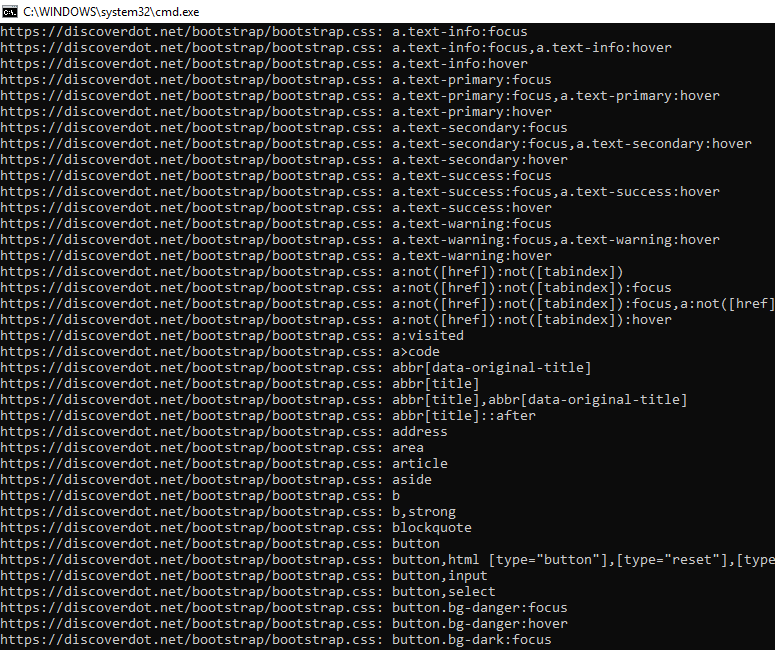 Uncss results
#Conclusion
AngleSharp is a great library for working with HTML documents. It follows the W3C specification, so it parses pages the same way a browser would. There are existing tools for finding unused CSS, such as uncss. That said, building my own tool to fit my exact use case was worthwhile. It is a small project, so it was not time-consuming, and it was a good opportunity to explore AngleSharp.
Do you have a question or a suggestion about this post? Contact me!
