As a developer, I often need to search for information about the tools and frameworks I use. Most technical resources are provided in English, but some companies, such as Microsoft (MSDN), also translate their resources into French and other languages. Since I'm located in France, I often get the French version first. Unfortunately, translations are often inaccurate, so I prefer the original English version.
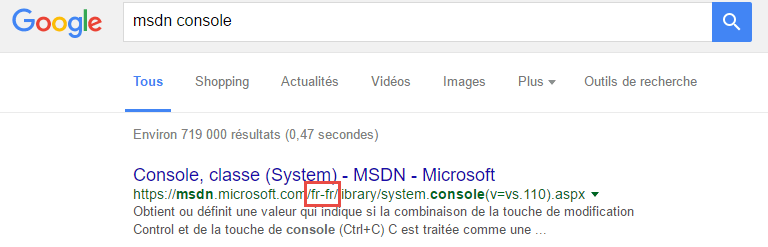
Instead of changing the language on the website or manually rewriting the URL every time, I decided to create an extension for my favorite web browser: Opera. Opera is based on Chromium, so the extension also works on Chrome and Vivaldi 😃
#How does the extension work?
The extension injects a JavaScript file on every website. This script checks if the location is something like msdn.microsoft.com/fr-fr/. When a match is found, the location is changed to msdn.microsoft.com/en-us/.
First, we need to create a manifest file. The manifest contains the name and description of the extension, along with various optional declarations such as the required permissions, the list of actions in the action bar, etc. Let's create the manifest.json file:
JSON
{
  "manifest_version": 2,
  "name": "Show me English!",
  "description": "Redirect to English version of websites when available",
  "version": "1.0",
  "content_scripts": [
    {
      "matches": [
        "http://*/*",
        "https://*/*"
      ],
      "js": [
        "redirect.js"
      ]
    }
  ]
}
We declare the JavaScript file to inject in the content_scripts field. matches allows you to specify the list of domains into which the scripts are injected. In this case, we want to match all websites (protocol http or https), so we use wildcards.
Here's the redirect.js file:
JavaScript
(function () {
    function areEqualsIgnoreCase(a, b) {
        return a.toLowerCase() === b.toLowerCase()
    }

    // 1\.  Get the current url
    // 2\. Replace the language part of the "msdn" url by en-us
    // 3\. Navigate to the new url if different from the original url
    var href = window.location.href;
    var newHref = href.replace(/(.*.msdn.microsoft.com\/)([a-z]{2}-[a-z]{2})(.*)/i, "$1en-us$3");
    if (!areEqualsIgnoreCase(href, newHref)) {
        window.location = newHref;
        return;
    }
})();
Now we need to install the extension in the browser. For testing purposes, we can enable developer mode. Navigate to "chrome://extensions/" or "opera://extensions/", click "Load unpacked extension…", and select the directory containing the extension files:

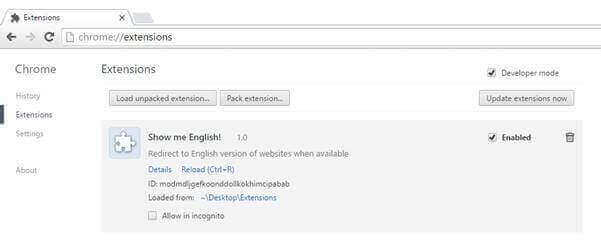
The final step is to pack the extension using the button "Pack extension…" and upload it to the store.
Voilà! It's very easy to create an extension that injects a script or a stylesheet into a page to extend its default behavior. Learn how to create more complex extensions in the official documentation.
Do you have a question or a suggestion about this post? Contact me!
