Deploying a database raises several challenges:
- What should the target database contain?
- How do you update an existing database?
- Does the production database have the correct schema?
To address these challenges, there are several approaches:
Manual management
The user creates specific scripts to create or update each database. Source of errors and waste of time… in short, it's not the recommended solution.
Migration version by version
You define versions of the database (version 1, version 2, …) and the scripts to migrate from version N to N+1. If the database is at v2 and you want to migrate it to v4, you apply the v2->v3 script and then the v3->v4 script. This is the approach used by Entity Framework Migrations, for example.
Desired State
The target database schema is defined in a file and the tool manages to move the existing database to the target version (regardless of the current version). This is the solution chosen by the SQL Server team with the Data-Tier Application (solution described in the rest of the article) or by SQL Compare RedGate (paid solution).
In the rest of this post, we will explore the solution provided by SQL Server: DAC packages (DACPAC).
#What is DacPac?
A DacPac file is a zip archive containing mainly an XML file. This file contains all the information of the database schema: the list of tables, columns, stored procedures, triggers, etc. Almost all kinds of objects of SQL Server are supported. More details on MSDN: DAC Support For SQL Server Objects and Versions
So you have a file that alone can describe the contents of the database. This can be very useful when you have to exchange the DB schema with someone else (for example, between a developer and a DBA).
Finally, this file can be deployed on a SQL server to create a new database or update an existing database. This procedure can be done through SQL Server Management Studio or the command line via the SqlPackage.exe. In the case of a migration, a migration script is generated and executed. You can validate that the script corresponds to what is expected. For some migrations, there are warnings to indicate for example that there can potentially be a loss of data.
#Creating a DacPac file
There are several ways to create a dacpac:
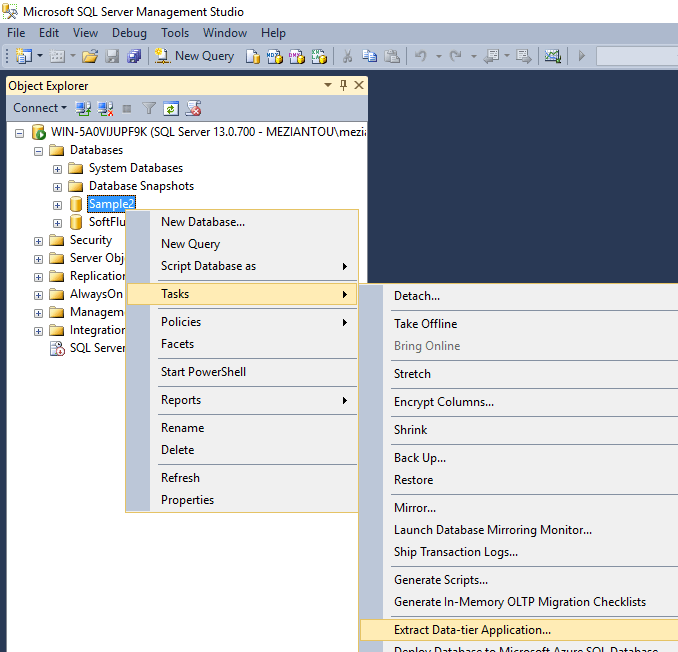
Using SQL Server Management Studio
Using SqlPackage.exe
SqlPackage is the command-line utility for manipulating dacpacs. To create a dacpac from an existing database you can use the extract command:
Shell
sqlpackage.exe "/action:extract"
              "/TargetFile:Sample.Database.dacpac"
              "/SourceConnectionString:Server=(localdb)\MSSQLLocalDB;Database=Sample.Database;Trusted_Connection=True;"
Visual Studio database project
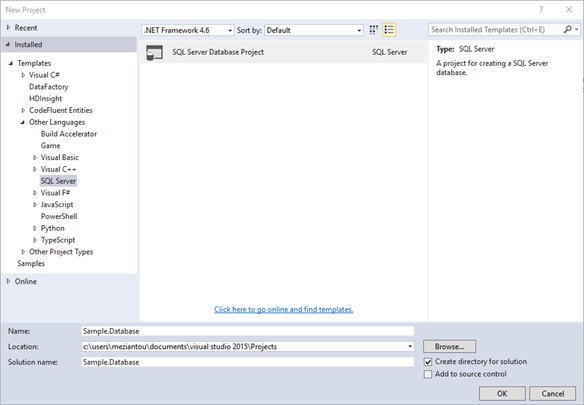
This kind of project is integrated with Visual Studio and contains creation scripts for objects (tables, triggers, etc.). When compiling this type of project a dacpac file is produced. I will explain this kind of projects in more details in the next article.
#Deploying the dacpac file
For deploying a dacpac file, you can use the same tools, and also WebDeploy. In the case of WebDeploy, this allows you to deploy a website and its database in a single operation. You can find all the information on the IIS website: https://learn.microsoft.com/en-us/iis/publish/using-web-deploy/dbdacfx-provider-for-incremental-database-publishing
Deployment can be done using the GUI or the command line:
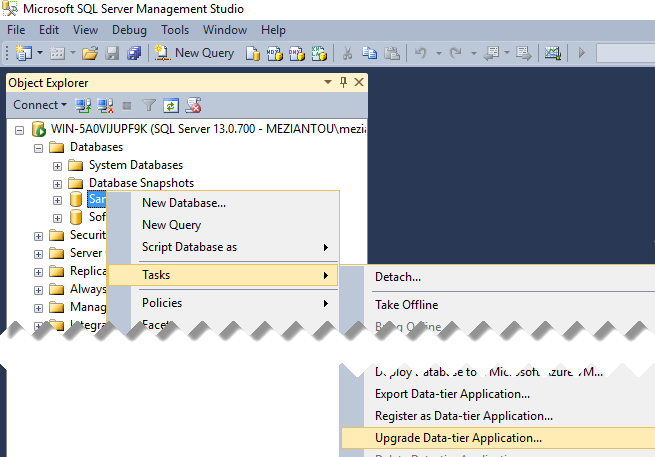
Using SQL Server Management Studio
Using SqlPackage.exe
Shell
sqlpackage.exe "/action:Script"
              "/SourceFile:Sample.Database.dacpac"
              "/TargetConnectionString:Server=(localdb)\MSSQLLocalDB;Database=Sample.Database;Trusted_Connection=True;"
              "/outputpath:PublishScript.sql"
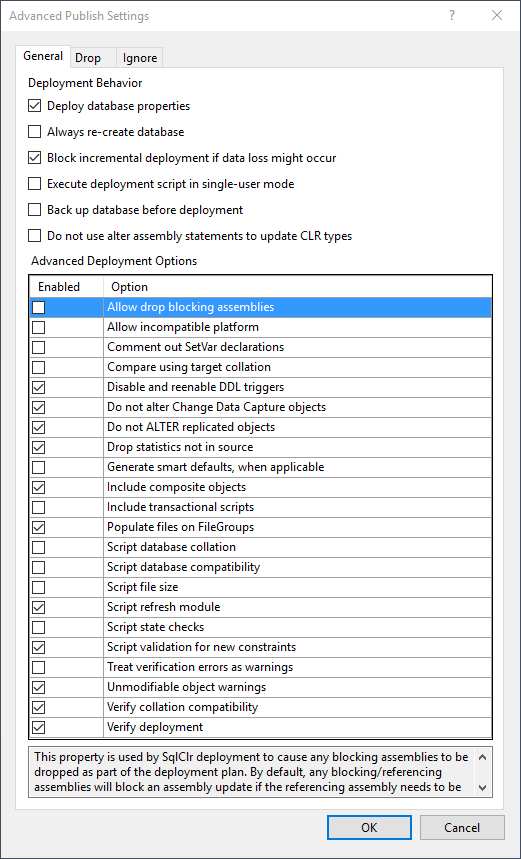
There are many options to customize the operations performed when creating the deployment script (useful mainly for updates):
Here is an excerpt from a migration script. In this script, the Product table is created, the Customer table schema has changed (the identity column increment was modified) and is updated without data loss using a temporary table, and the stored procedures associated with the modified tables are refreshed. This shows that the migration engine is capable of handling advanced schema changes.
SQL
PRINT N'Creating [dbo].[Product]...';
GO
CREATE TABLE [dbo].[Product] (
    [Id]          INT           NOT NULL,
    [DisplayName] NVARCHAR (50) NOT NULL,
    [Price]       MONEY         NOT NULL,
    PRIMARY KEY CLUSTERED ([Id] ASC)
);
GO
PRINT N'Refreshing [dbo].[Customer_LoadAll]...';
GO
EXECUTE sp_refreshsqlmodule N'[dbo].[Customer_LoadAll]';
GO

PRINT N'Starting rebuilding table [dbo].[Customer]...';
GO
BEGIN TRANSACTION;
SET TRANSACTION ISOLATION LEVEL SERIALIZABLE;
SET XACT_ABORT ON;

CREATE TABLE [dbo].[tmp_ms_xx_Customer] (
    [Id]              INT           NOT NULL,
    [FirstName]       NVARCHAR (50) NOT NULL,
    [LastName]        NVARCHAR (50) NOT NULL,
    [Identity_column] INT           IDENTITY (1, 2) NOT NULL,
    [DateOfBirth]     DATE          NOT NULL,
    PRIMARY KEY CLUSTERED ([Id] ASC)
);

IF EXISTS (SELECT TOP 1 1
           FROM   [dbo].[Customer])
    BEGIN
        SET IDENTITY_INSERT [dbo].[tmp_ms_xx_Customer] ON;
        INSERT INTO [dbo].[tmp_ms_xx_Customer] ([Id], [FirstName], [LastName], [Identity_column], [DateOfBirth])
        SELECT   [Id],
                 [FirstName],
                 [LastName],
                 [Identity_column],
                 [DateOfBirth]
        FROM     [dbo].[Customer]
        ORDER BY [Id] ASC;
        SET IDENTITY_INSERT [dbo].[tmp_ms_xx_Customer] OFF;
    END

DROP TABLE [dbo].[Customer];
EXECUTE sp_rename N'[dbo].[tmp_ms_xx_Customer]', N'Customer';
COMMIT TRANSACTION;
#Validating the deployment
The SqlPackage tool provides functionality to compare the schema of a database with a dacpac and it can generate a drift report.
Shell
sqlpackage.exe "/action:DriftReport"
               "/TargetConnectionString:Server=(localdb)\MSSQLLocalDB;Database=Sample.Database;Trusted_Connection=True;"
               "/outputpath:Report.xml"
The generated report is an XML file. For example, following the modification of a column of a table, the file is the following:
XML
<DriftReport xmlns="http://schemas.microsoft.com/sqlserver/dac/DriftReport/2012/02">
  <Additions />
  <Removals />
  <Modifications>
    <Object Name="[DateOfBirth]" Parent="[dbo].[Customer]" Type="SqlSimpleColumn" />
    <Object Name="[Customer]" Parent="[dbo]" Type="SqlTable" />
  </Modifications>
</DriftReport>
#Conclusion
DACPACs make it much easier to manage the database's lifecycle by allowing you to create or update a database using a single file that describes the desired schema. I strongly advise you to take a closer look at dacpac, unless you already have another tool that meets this need.
Note for developers: SqlPackage.exe (and its associated DLLs) is a .NET application, so you can use it directly in your own applications if needed. The files are likely already on your disk at C:\Program Files (x86)\Visual Studio 14.0\Common7\IDE\Extensions\Microsoft\SQLDB.
Do you have a question or a suggestion about this post? Contact me!
