Promises are ubiquitous in JavaScript and TypeScript. Many browser APIs rely on them, including fetch and Service Worker registration. The async/await syntax makes working with promises even more convenient.
TypeScript
function delay(ms: number) {
    return new Promise(resolve => {
        setTimeout(resolve, ms);
    });
}

async function simulateLongComputation() {
    await delay(100);
    return 42;
}
However, it is easy to forget to await a promise, especially when refactoring. Even without the await keyword, the TypeScript file remains perfectly valid and the compiler raises no error. But the code does not behave as expected. This pattern is called fire-and-forget: you start a promise but never handle its result, whether it succeeds or fails. This is rarely the intended behavior.
TypeScript
function checkValueAsync(value: any) {
    return new Promise((resolve, reject) => {
        if (value) {
            resolve();
        } else {
            reject();
        }
    });
}

try {
    checkValueAsync(null); // missing await here
} catch (ex) {
    console.log(ex); // no error, because the promise is not awaited
}
The only indication of a problem is a console error if the promise rejects:
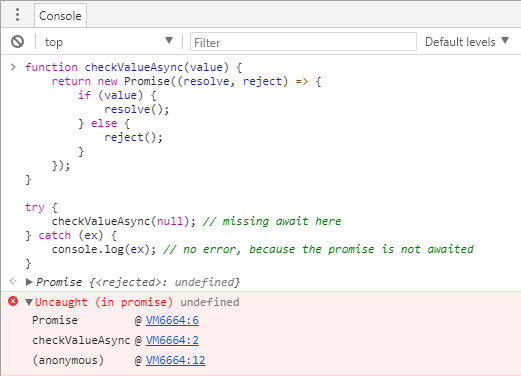 Google Chrome Developer tools error message
If you are familiar with C#, you may know that the compiler warns about unawaited tasks. The TypeScript compiler offers no such option, so you need an alternative. Since version 4.4, TSLint can detect floating promises in your code.
#Using TSLint to detect floating promises
TSLint is an extensible static analysis tool that checks TypeScript code for readability, maintainability, and functionality errors. It is widely supported across modern editors & build systems and can be customized with your own lint rules, configurations, and formatters.
Download TSLint: npm install -g tslint typescript
Configure TSLint:
TSLint provides lots of rules. In this post, we'll only use the one to detect floating promises.
Create a file named tslint.json in the root directory of your project with the following content:
JSON
{
    "extends": "tslint:recommended",
    "rules": {
        "no-floating-promises": true
    }
}
Note: If you are using JQuery promises or any other alternative to standard promises, you have to adapt the configuration with something similar to: "no-floating-promises": [true, "JQueryPromise"].
Run tslint: tslint --project tsconfig.json
Shell
PS F:\Samples> tslint --project tsconfig.json

ERROR: F:/Samples/index.ts[12, 5]: Promises must be handled appropriately
TSLint now makes it easy to detect every place where you forgot to await a promise.
If you intentionally want the fire-and-forget behavior, you can disable the TSLint rule for that specific line:
TypeScript
// tslint:disable-next-line:no-floating-promises
checkValueAsync(null);
Alternatively, you can use the void operator to explicitly discard the return value:
TypeScript
void checkValueAsync(null);
#Conclusion
TSLint is a valuable addition to any TypeScript project. It integrates easily into your build pipeline. This post covers just one of its rules, but TSLint offers more than 100 rules to help keep your code correct and maintainable.
#Additional resources
Do you have a question or a suggestion about this post? Contact me!
