HTTP Strict Transport Security (HSTS) is a security mechanism that instructs the browser to automatically redirect HTTP requests to HTTPS before sending a request to the server. When developing a web application, you should avoid enabling HSTS for localhost, as it affects all applications sharing that hostname. For example, some tools start a local web server and open a browser but cannot use a certificate, so they rely on plain http. If any website enables HSTS on localhost, those tools will break because they are not listening on https.
#Clearing HSTS policy manually
You can open the page about://net-internals/#hsts in the browser and clear HSTS data for localhost:
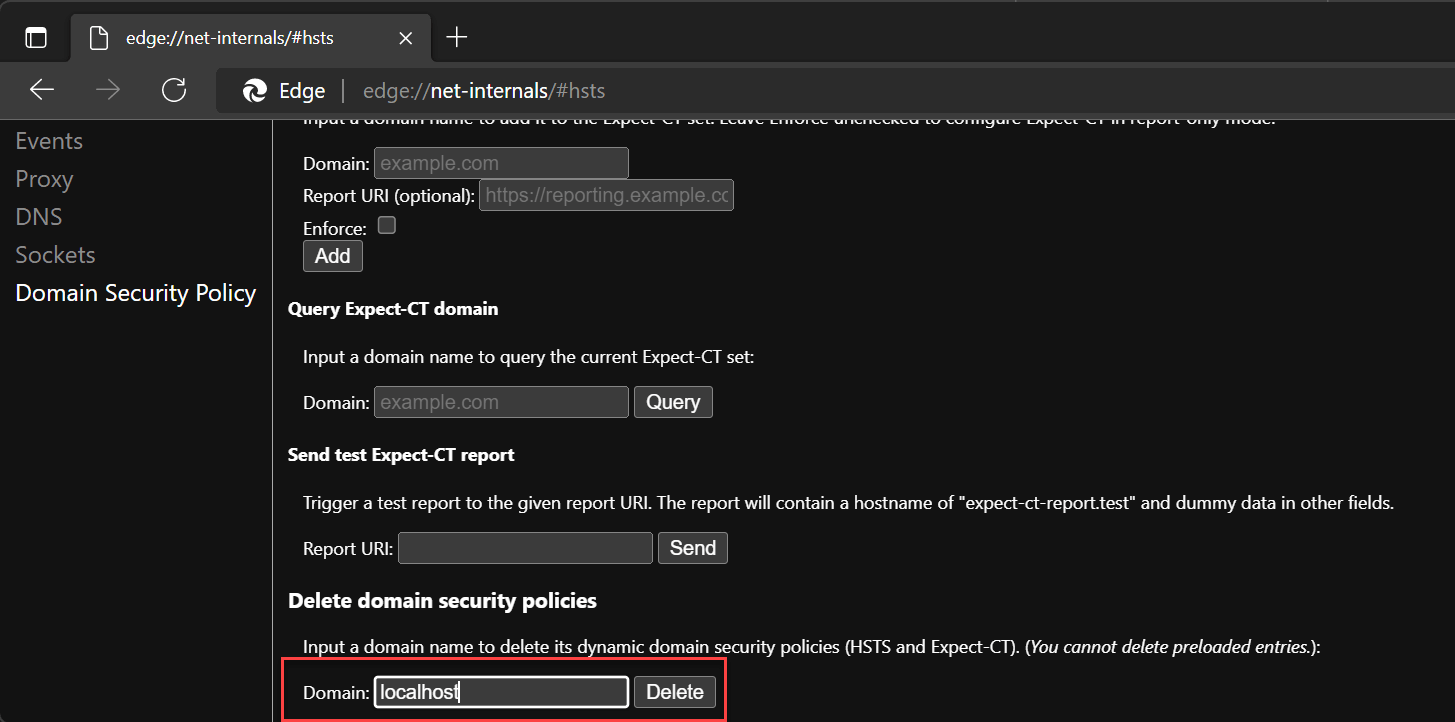
#Using another domain for development
HSTS is scoped per domain, so you can use a custom domain for development instead of localhost. For example, using myapp.local means that even if your app sets an HSTS header, it will not affect other applications using localhost. To configure this, add the domain to your HOSTS file:
C:\Windows\System32\drivers\etc\hosts
127.0.0.1 myapp.local
Then, you can use https://myapp.local in your browser.
Do you have a question or a suggestion about this post? Contact me!
