This post is part of the series 'Password management'. Be sure to check out the rest of the blog posts of the series!
I've written a lot about storing passwords in an application. It is the developer's responsibility to ensure there are no security issues in how passwords are stored. However, it is up to the user to choose a password that is not easy to break. You've probably seen this from xkcd:
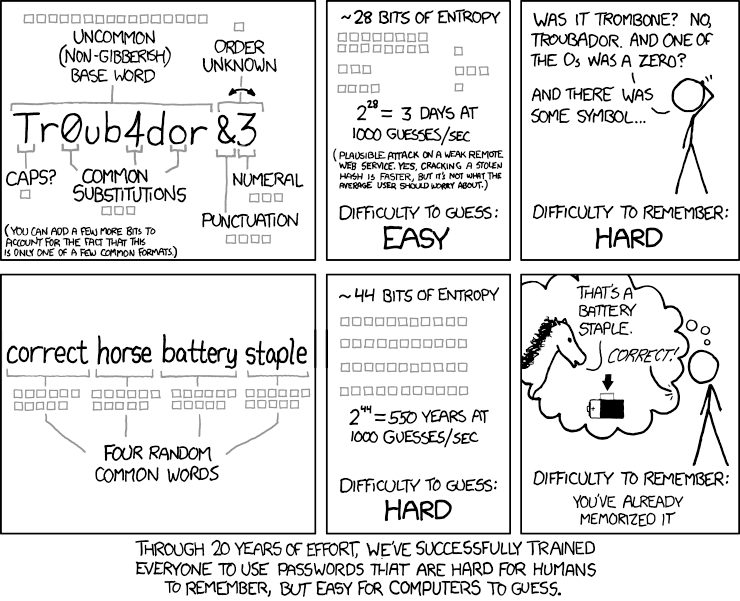 xkcd: Password Strength (source))
Creating a good password is not easy. Creating a unique password for every website is even harder. Password managers can help with this, but that is not the focus of this post.
Let's see how to help users create strong passwords!
#Allow the user to use a strong password
✓ Allow the user to paste passwords. This lets users take advantage of a password manager, which is good practice since password managers help maintain a unique and strong password for each service.
✓ Do not limit the password length to a low value. If a user wants a 30-character password, let them. They probably use a password manager, or have a very good memory!
✓ Do not limit the allowed characters. Anyway, on the server, you'll convert it to a byte array and hash it, so it shouldn't be a problem to accept any Unicode character.
#Display the strength/complexity of the password
The first thing you can do is show the strength of the chosen password and offer suggestions to improve it. Multiple criteria matter: the length, the variety of characters (letters, numbers, symbols), and the uniqueness of the password. Here's what it can look like:
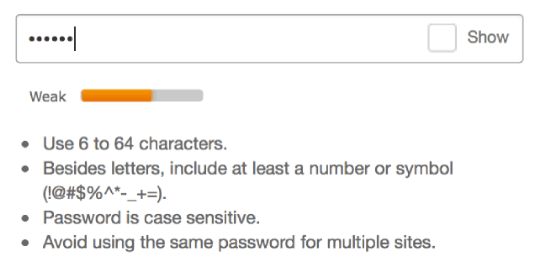 Password strength indicator
There are many libraries for every language to compute password strength. For instance, you can use zxcvbn (GitHub) from Dropbox, which returns a score from 0 to 4 for a given password. You can also check the answers to this Stack Overflow question for other libraries.
#Check the password has not leaked
 Have I Been Pwned
Once you have a strong password, you should verify it has not appeared in a data breach. A leaked password may have been used by you or another user on another service whose database was compromised, making the password unsafe to reuse. The "Have I Been Pwned" service maintains a large list of leaked passwords. You can query its API to check whether a password is on the list. For privacy, you only need to send the first 5 characters of the SHA1 hash, not the password itself. The API is free and the documentation is available at: https://haveibeenpwned.com/API/v2.
Security note: The password is never sent to the external service. Only the first 5 characters of the SHA1 hash are transmitted. Hashing is a one-way operation; you cannot recover the original password from its hash. In practice, this can sometimes be reversed using rainbow tables or tools like John the Ripper or hashcat. Have I Been Pwned only requires the first 5 characters of the hash. A SHA1 hash is 160 bits long, and 5 hex characters encode only the first 20 bits. This gives HIBP just 1/8th of the full hash, which is far too little to recover the original password. If you are not familiar with password hashing, see my previous post about storing passwords in a web application.
Here's how to use it to validate a password in .NET:
C#
private static async Task<bool> IsCompromisedAsync(string password)
{
    var hash = ComputeSha1(password);
    var hashPrefix = hash.Substring(0, 5);
    var hashSuffix = hash.Substring(5);
    using (var httpClient = new HttpClient())
    {
        httpClient.DefaultRequestHeaders.Add("User-Agent", "MySampleApp");
        httpClient.DefaultRequestHeaders.Add("api-version", "2");
        using (var response = await httpClient.GetAsync("https://api.pwnedpasswords.com/range/" + hashPrefix))
        {
            response.EnsureSuccessStatusCode();
            var content = await response.Content.ReadAsStringAsync();

            // The content contains a list of hashes that start with the prefix
            // We now have to check if our hash is in the list
            var lines = content.Split('\n');
            return lines.Any(line => line.StartsWith(hashSuffix, StringComparison.OrdinalIgnoreCase));
        }
    }
}

private static string ComputeSha1(string value)
{
    var bytes = Encoding.UTF8.GetBytes(value);
    using (var sha1 = SHA1.Create())
    {
        var hash = sha1.ComputeHash(bytes);
        return ToHexa(hash);
    }
}

private static string ToHexa(byte[] bytes)
{
    var Result = new StringBuilder(bytes.Length * 2);
    const string HexChars = "0123456789ABCDEF";

    foreach (byte b in bytes)
    {
        Result.Append(HexChars[b >> 4]);
        Result.Append(HexChars[b & 0xF]);
    }

    return Result.ToString();
}
You can call IsCompromisedAsync to check whether a password has been compromised, then inform the user that their password is not safe.
Your application now offers a great user experience for creating robust passwords!
Do you have a question or a suggestion about this post? Contact me!
