This post is part of the series 'Password management'. Be sure to check out the rest of the blog posts of the series!
There are many examples of projects that contain secrets in the source code. A secret can be a password, a server configuration, a token used to connect to a service, a certificate, and so on. You can search for "Remove password" on GitHub to find more than 400k commits. These secrets are typically used for deploying the application or connecting to an external service.
Let's explore different ways to avoid storing passwords in code. Some approaches depend on the technologies you use.
#Secret variables in CI
If your secrets are used to deploy your application, for example in a PowerShell script, you can use secret variables. Every build system, such as Azure Pipeline, Jenkins, or Travis, provides a way to declare secret variables. These variables are exposed as environment variables or through a custom pipeline syntax, and their values are hidden from the logs.
Environment variables are accessible in batch files and applications. For example, with Azure Pipeline:
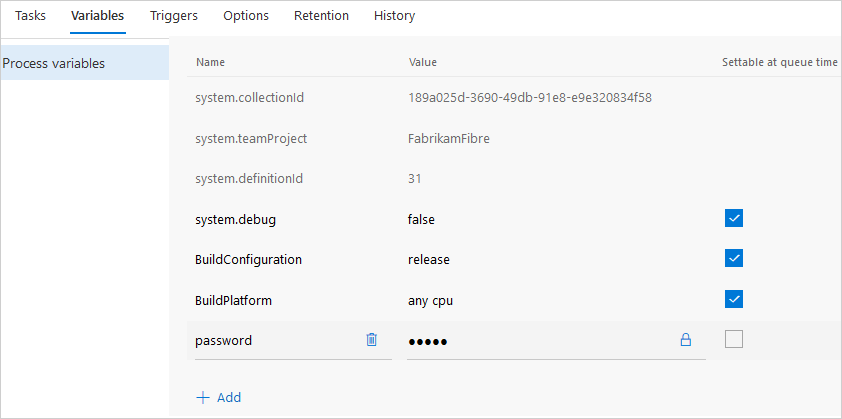 Azure Pipeline - Secret variables
YAML
steps:
- powershell: Write-Host "$(password)"
#Environment variables
You can define environment variables per user on your development machine. In the code, you only need to know the name of the variable, not its value. This keeps your secrets out of the source code. However, environment variable values are not encrypted and are easily accessible to other applications. This solution may be sufficient for development, but not for production.
#ASP.NET Core - User secrets
In ASP.NET Core, configuration can come from multiple sources: JSON files, XML files, environment variables, and more. During development, you may need to store sensitive data without committing it to source control. The Secret Manager tool stores sensitive data in a JSON file under %appdata%, ensuring it is never committed. It works like the appsettings.json file at the root of your project, and a configuration provider reads and merges these values with the rest of your project configuration.
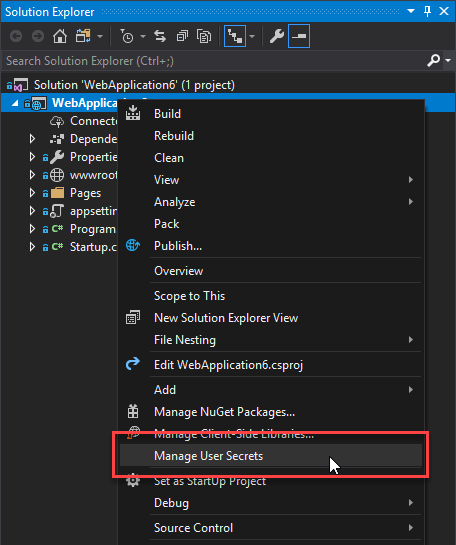
It also works from the command line:
Shell
dotnet user-secrets set "MyApp:Password" "123456"
For more details, you can read the documentation: Safe storage of app secrets in development in ASP.NET Core. If you are using Visual Studio, you can also read this blog post: Managing Secrets in .NET CORE 2.0 Apps.
#Azure Key Vault / AWS Key Management Service / Google Cloud Key Management Service
All major cloud providers offer a secure way to manage secrets. These solutions are a reliable choice for storing secrets used by applications hosted on their platforms. They also provide additional features such as audit logs that record who accessed secrets and when, which can help you detect unauthorized access.
The integration approach depends on the service you use. For Azure, you can easily integrate Azure Key Vault (AKV) with ASP.NET Core:
C#
public static IWebHostBuilder CreateWebHostBuilder(string[] args) =>
    WebHost.CreateDefaultBuilder(args)
        .ConfigureAppConfiguration((context, config) =>
        {
            var builtConfig = config.Build();

            config.AddAzureKeyVault(
                $"https://{builtConfig["Vault"]}.vault.azure.net/",
                // The credentials are not needed if you use a Managed Service Identity https://learn.microsoft.com/en-us/samples/azure-samples/app-service-msi-keyvault-dotnet/keyvault-msi-appservice-sample/?WT.mc_id=DT-MVP-5003978
                builtConfig["ClientId"],
                builtConfig["ClientSecret"]);
        })
        .UseStartup<Startup>();
For other types of applications, you can use the client libraries directly:
#Docker secrets
Docker provides a built-in mechanism for managing secrets in containers. It lets you create secrets and grant specific containers permission to access them. If you are using Docker, this is a good approach for storing secrets securely.
Shell
docker secret create sample Password
docker service create --name redis --secret sample image
You can also access Docker secrets from ASP.NET Core as part of the configuration:
C#
public Startup(IHostingEnvironment env)
{
    var builder = new ConfigurationBuilder()
        .SetBasePath(env.ContentRootPath)
        .AddJsonFile("appsettings.json", optional: false, reloadOnChange: true)
        .AddJsonFile($"appsettings.{env.EnvironmentName}.json", optional: true)
        .AddEnvironmentVariables()
        .AddDockerSecrets();

    Configuration = builder.Build();
}
You can read more about docker secrets in the documentation.
#Avoid using passwords
The best way to avoid storing passwords in code is to eliminate the need for them altogether. This does not mean the system is less secure; it simply uses a different authentication mechanism. Setting up a Single Sign-On (SSO) solution such as Windows Authentication can significantly reduce the number of passwords required. For example, you can use Windows Authentication to access a SQL Server database or internal web services. No additional configuration is needed on your machine; everything works right after cloning the repository.
Do you have a question or a suggestion about this post? Contact me!
