This post is part of the series 'Password management'. Be sure to check out the rest of the blog posts of the series!
A password is a very sensitive piece of information. It allows a user to authenticate with an application. You should not store it like any other data. We regularly see reports of passwords being leaked. This has happened to LinkedIn, Adobe, 500px, and unfortunately many more. You have to make sure such incidents cannot happen in your applications. You are responsible for your users' data. What will your customers think if your company makes headlines for leaking user accounts? This is not a subject to take lightly.
Here are some strategies for storing passwords. Some are no-go, but are included here to explain why they are wrong.
#❌ Store passwords in clear
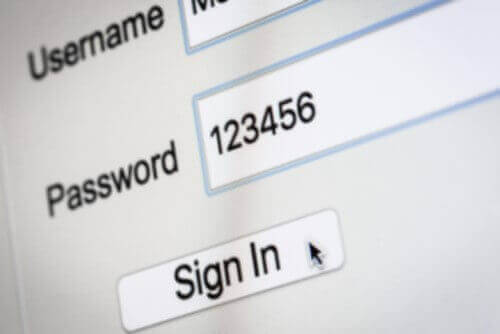
Clearly, this idea should not even cross your mind! Anyone with read access to your database can access this information. While the database should not be directly accessible to your users in a web application, you never know what can happen. You may be vulnerable to a SQL injection and thereby expose all your data, including the passwords. Your hosting provider may have access to the database or a backup. What about a rogue administrator? Also, users often reuse the same password across websites. So if an attacker gets access to your database, they may reuse that data to authenticate as a user on multiple websites.
#❌ Implement your own algorithm
Security is not as easy as it seems. There are many places where you can introduce security flaws. Most issues with existing algorithms have already been identified, and some are very tricky. So unless you are a security expert, stick with a standard, approved algorithm. You should also avoid implementing the standard algorithm yourself. Instead, use an implementation provided by the operating system, the .NET framework, or a well-tested library such as openssl. These implementations are battle-tested and receive security fixes when needed.
#❌ Encrypt passwords
This method consists of encrypting the password with a key stored on the server. You can then decrypt the password to compare it with the one entered by the user. This means that anyone with the key can recover the user's actual password.
This method does not adequately protect the password because if your database is compromised, there is a good chance the encryption key is too. The attacker will be able to decrypt the passwords. The same issues from the previous section also apply (password reuse, trust in the hosting provider, etc.).
#❌ Hash passwords
A hash function is a one-way function that always returns the same value for a given input. This means that two identical passwords produce the same hash. Instead of storing the password in the database, you can store its hash. Then, to validate a user's password, you calculate the hash of the entered password and compare it with the hash stored in the database.
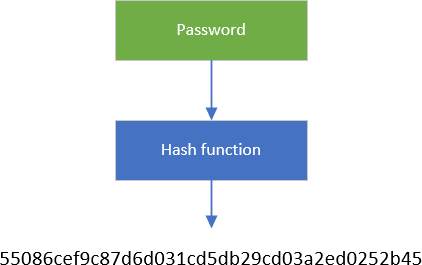
There are several hash algorithms such as MD5, SHA1, SHA2, SHA3… However, some algorithms are considered unsafe, including MD5 and SHA1, so do not use them. Always check the status of each algorithm when implementing your application, as recommendations can change between publication and when you read this.
C#
public static string HashPassword(string password, string algorithm = "sha256")
{
   return Hash(Encoding.UTF8.GetBytes(password), algorithm);
}

private static string Hash(byte[] input, string algorithm = "sha256")
{
    using (var hashAlgorithm = HashAlgorithm.Create(algorithm))
    {
        return Convert.ToBase64String(hashAlgorithm.ComputeHash(input));
    }
}
A hash function is a one-way function, so in theory you cannot recover the original password from its hash. In practice, however, you can use Rainbow Tables. A rainbow table is a precomputed table for reversing cryptographic hash functions. They are typically used to recover passwords up to a certain length that consist of a limited character set. You can use a tool such as John The Ripper or hashcat to see how quickly the original password can be retrieved from a hash.
#✓ Hash passwords with salt
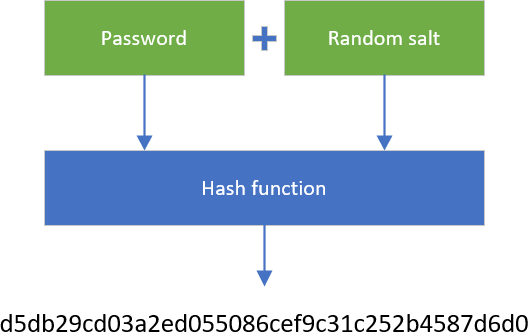
A solution to prevent the use of Rainbow Tables is to add random data (a salt) to the password before calling the hash function. This way, an attacker needs to reverse hash(salt + password) to get the actual password. As you cannot generate a rainbow table for every possible salt + password, there is no easy way to reverse the hash function. The only way is to use a brute-force attack with the given salt.
How to store a password?
- Generate a new random salt
- Compute hash(salt + password)
- Save the salt and the result of the hash function.
How to validate a password?
- Read the user's salt from the database
- Compute hash(salt + password)
- Compare the result of the hash function with the hash in the database
A few things about security:
- The salt must be unique per password!
- The salt must be long enough, so you are sure there is no existing rainbow table. 128 bits seem ok at the moment.
C#
public sealed class PasswordHasher
{
    public byte Version => 1;
    public int SaltSize { get; } = 128 / 8; // 128 bits
    public HashAlgorithmName HashAlgorithmName { get; } = HashAlgorithmName.SHA256;

    public string HashPassword(string password)
    {
        if (password == null)
            throw new ArgumentNullException(nameof(password));

        // The salt must be unique for each password
        byte[] salt = GenerateSalt(SaltSize);
        byte[] hash = HashPasswordWithSalt(password, salt);

        var inArray = new byte[1 + SaltSize + hash.Length];
        inArray[0] = Version;
        Buffer.BlockCopy(salt, 0, inArray, 1, SaltSize);
        Buffer.BlockCopy(hash, 0, inArray, 1 + SaltSize, hash.Length);

        return Convert.ToBase64String(inArray);
    }

    public PasswordVerificationResult VerifyHashedPassword(string hashedPassword, string password)
    {
        if (password == null)
            throw new ArgumentNullException(nameof(password));

        if (hashedPassword == null)
            return PasswordVerificationResult.Failed;

        Span<byte> numArray = Convert.FromBase64String(hashedPassword);
        if (numArray.Length < 1)
            return PasswordVerificationResult.Failed;

        byte version = numArray[0];
        if (version > Version)
            return PasswordVerificationResult.Failed;

        var salt = numArray.Slice(1, SaltSize).ToArray();
        var bytes = numArray.Slice(1 + SaltSize).ToArray();

        var hash = HashPasswordWithSalt(password, salt);

        if (FixedTimeEquals(hash, bytes))
            return PasswordVerificationResult.Success;

        return PasswordVerificationResult.Failed;
    }

    private byte[] HashPasswordWithSalt(string password, byte[] salt)
    {
        byte[] hash;
        using (var hashAlgorithm = HashAlgorithm.Create(HashAlgorithmName.Name))
        {
            byte[] input = Encoding.UTF8.GetBytes(password);
            hashAlgorithm.TransformBlock(salt, 0, salt.Length, salt, 0);
            hashAlgorithm.TransformFinalBlock(input, 0, input.Length);
            hash = hashAlgorithm.Hash;
        }

        return hash;
    }

    private static byte[] GenerateSalt(int byteLength)
    {
        using (var cryptoServiceProvider = new RNGCryptoServiceProvider())
        {
            var data = new byte[byteLength];
            cryptoServiceProvider.GetBytes(data);
            return data;
        }
    }

    // In .NET Core 2.1, you can use CryptographicOperations.FixedTimeEquals
    // https://github.com/dotnet/runtime/blob/419e949d258ecee4c40a460fb09c66d974229623/src/libraries/System.Security.Cryptography.Primitives/src/System/Security/Cryptography/CryptographicOperations.cs#L32
    [MethodImpl(MethodImplOptions.NoInlining | MethodImplOptions.NoOptimization)]
    public static bool FixedTimeEquals(byte[] left, byte[] right)
    {
        // NoOptimization because we want this method to be exactly as non-short-circuiting as written.
        // NoInlining because the NoOptimization would get lost if the method got inlined.
        if (left.Length != right.Length)
        {
            return false;
        }

        int length = left.Length;
        int accum = 0;

        for (int i = 0; i < length; i++)
        {
            accum |= left[i] - right[i];
        }

        return accum == 0;
    }
}

public enum PasswordVerificationResult
{
    Failed,
    Success,
    SuccessRehashNeeded,
}
#✓✓ Use specialized hashing algorithms
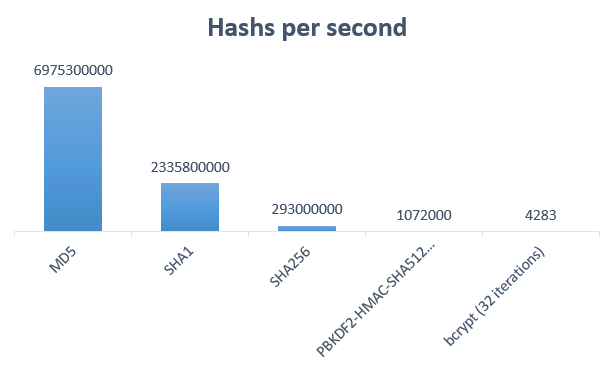
There are specialized algorithms for hashing passwords such as bcrypt, scrypt, or PBKDF2. These algorithms take longer than MD5 or SHA1 to compute a hash, making them more resistant to brute-force attacks. Their cost (or "work factor") is expressed as a number of iterations. This number is configurable and must be tuned appropriately (consult the algorithm's documentation and recommendations from public agencies such as NIST). The lower it is, the easier it will be to find the password. The higher it is, the more computing power is needed. Choose a value that meets current recommendations without being so high that it degrades the user experience or requires overpowered servers.
Using hashcat, you can see how many hashes per second you can generate. Here're the numbers on my computer:
 Hash computed per seconds
You can see that specialized algorithms are much slower than classic hash algorithms. This means it will take far more time to find the original password through a brute-force attack.
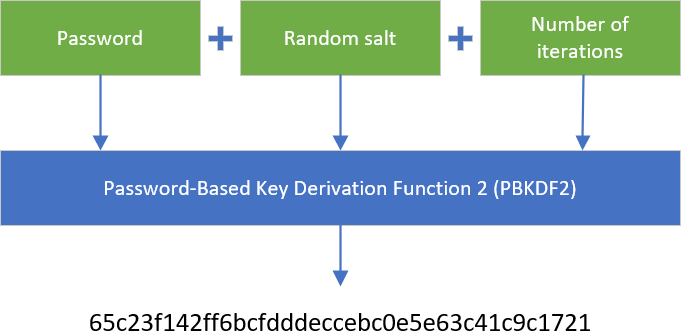
Here's an example of using PBKDF2 in C#. The following code also provides a way to rehash passwords if you change the number of iterations.
C#
public sealed class PasswordHasher
{
    public byte Version => 1;
    public int Pbkdf2IterCount { get; } = 50000;
    public int Pbkdf2SubkeyLength { get; } = 256 / 8; // 256 bits
    public int SaltSize { get; } = 128 / 8; // 128 bits
    public HashAlgorithmName HashAlgorithmName { get; } = HashAlgorithmName.SHA256;

    public string HashPassword(string password)
    {
        if (password == null)
            throw new ArgumentNullException(nameof(password));

        byte[] salt;
        byte[] bytes;
        using (var rfc2898DeriveBytes = new Rfc2898DeriveBytes(password, SaltSize, Pbkdf2IterCount, HashAlgorithmName))
        {
            salt = rfc2898DeriveBytes.Salt;
            bytes = rfc2898DeriveBytes.GetBytes(Pbkdf2SubkeyLength);
        }

        var inArray = new byte[1 + SaltSize + Pbkdf2SubkeyLength];
        inArray[0] = Version;
        Buffer.BlockCopy(salt, 0, inArray, 1, SaltSize);
        Buffer.BlockCopy(bytes, 0, inArray, 1 + SaltSize, Pbkdf2SubkeyLength);

        return Convert.ToBase64String(inArray);
    }

    public PasswordVerificationResult VerifyHashedPassword(string hashedPassword, string password)
    {
        if (password == null)
            throw new ArgumentNullException(nameof(password));

        if (hashedPassword == null)
            return PasswordVerificationResult.Failed;

        byte[] numArray = Convert.FromBase64String(hashedPassword);
        if (numArray.Length < 1)
            return PasswordVerificationResult.Failed;

        byte version = numArray[0];
        if (version > Version)
            return PasswordVerificationResult.Failed;

        byte[] salt = new byte[SaltSize];
        Buffer.BlockCopy(numArray, 1, salt, 0, SaltSize);
        byte[] a = new byte[Pbkdf2SubkeyLength];
        Buffer.BlockCopy(numArray, 1 + SaltSize, a, 0, Pbkdf2SubkeyLength);
        byte[] bytes;
        using (var rfc2898DeriveBytes = new Rfc2898DeriveBytes(password, salt, Pbkdf2IterCount, HashAlgorithmName))
        {
            bytes = rfc2898DeriveBytes.GetBytes(Pbkdf2SubkeyLength);
        }

        if (FixedTimeEquals(a, bytes))
            return PasswordVerificationResult.Success;

        return PasswordVerificationResult.Failed;
    }

    // In .NET Core 2.1, you can use CryptographicOperations.FixedTimeEquals
    // https://github.com/dotnet/runtime/blob/419e949d258ecee4c40a460fb09c66d974229623/src/libraries/System.Security.Cryptography.Primitives/src/System/Security/Cryptography/CryptographicOperations.cs#L32
    [MethodImpl(MethodImplOptions.NoInlining | MethodImplOptions.NoOptimization)]
    public static bool FixedTimeEquals(byte[] left, byte[] right)
    {
        // NoOptimization because we want this method to be exactly as non-short-circuiting as written.
        // NoInlining because the NoOptimization would get lost if the method got inlined.
        if (left.Length != right.Length)
        {
            return false;
        }

        int length = left.Length;
        int accum = 0;

        for (int i = 0; i < length; i++)
        {
            accum |= left[i] - right[i];
        }

        return accum == 0;
    }
}

public enum PasswordVerificationResult
{
    Failed,
    Success,
    SuccessRehashNeeded,
}
I don't use SuccessRehashNeeded in this example, but you would need it if you change the version of the algorithm. For instance, when you create your application, the recommendations indicate you can safely use PBKDF2 with 50,000 iterations. Two years later the recommendations change and you want to update the password hasher to reflect the new way to hash passwords. As you won't be able to update all saved passwords (you cannot retrieve the original password from the hash), you need to temporarily handle both algorithms (v1 and v2). When you validate the password using the first version of the password hasher, you return SuccessRehashNeeded if the password is valid. At that point, you have the actual password, so you can use the latest version of the password hasher to compute the new hash and save it.
#⚠ Beware of timing attacks
In the previous example, I use FixedTimeEquals to compare two byte arrays. Unlike a standard comparison, it always compares every element, even if the first ones differ. The purpose is to prevent an attacker from using a timing attack to guess the password. If you return early when a mismatch is detected, an attacker can determine that the beginning of the hash is incorrect and may be able to guess the password more quickly. FixedTimeEquals compares the two arrays in constant time, whether they are equal or not.
Read more: Practical Uses for Timing Attacks on Hash Comparisons (e.g. MD5)?
C#
// ❌ do not use this method to compare passwords
private static bool BadByteArraysEqual(byte[] a, byte[] b)
{
    if (a == null || b == null || a.Length != b.Length)
        return false;

    for (int index = 0; index < a.Length; ++index)
    {
        if (a[index] != b[index])
            return false; // early exit
    }

    return true;
}
Instead, you should use the following method. Don't forget the MethodImpl attributes to ensure the method is not inlined and the JIT does not try to optimize the method.
C#
// In .NET Core 2.1, you can use CryptographicOperations.FixedTimeEquals
// https://github.com/dotnet/runtime/blob/419e949d258ecee4c40a460fb09c66d974229623/src/libraries/System.Security.Cryptography.Primitives/src/System/Security/Cryptography/CryptographicOperations.cs#L32
[MethodImpl(MethodImplOptions.NoInlining | MethodImplOptions.NoOptimization)]
public static bool FixedTimeEquals(byte[] left, byte[] right)
{
    // NoOptimization because we want this method to be exactly as non-short-circuiting as written.
    // NoInlining because the NoOptimization would get lost if the method got inlined.

    if (left.Length != right.Length)
        return false;

    int length = left.Length;
    int accum = 0;

    for (int i = 0; i < length; i++)
    {
        accum |= left[i] - right[i];
    }

    return accum == 0;
}
#✓✓ Get rid of passwords
You can avoid storing passwords by using authentication schemes that do not require processing passwords on the server.
You can rely on external identity providers to handle authentication using OpenId or OpenId Connect (OIDC). This way you let other providers, such as Microsoft, Google, or Apple, handle password management and all the complexity of authenticating a user.
WebAuthn allows users to log into internet accounts using their preferred device. Web services and apps can, and should, enable this functionality to give their users an easier login experience via biometrics, mobile devices, and/or FIDO security keys, with much higher security than passwords alone.
OPAQUE is a protocol that authenticates a user while keeping the password on the client machine. This way, the server never knows the user's actual password.
#Conclusion
Use modern authentication methods that do not involve passwords whenever possible. If you still need to store passwords, use a one-way function that combines the password with a unique salt to produce a hash. This transformation must be computationally intensive to resist brute-force attacks, but not so slow as to degrade server performance. Use specialized algorithms such as PBKDF2 or bcrypt to benefit from their built-in safeguards.
Do not forget that security is not only about storing passwords. There are many other things you must pay attention to. For instance, if the connection between the client and the server is not secure, someone can intercept the password before it reaches the server. You can prevent this by using HTTPS to secure the connection. This is just one of many possible problems. Don't forget: security is hard.
#Additional resources
Do you have a question or a suggestion about this post? Contact me!
