This post is part of the series 'Password management'. Be sure to check out the rest of the blog posts of the series!
In the previous post, I wrote about storing a password to authenticate a user. In this post, the goal is to store a password on the local machine to avoid entering it every time. For instance, you may not want to re-enter your credentials each time you open an application like OneNote. You need to save the password and be able to read it back later. As discussed in my previous post about cryptography, you need to encrypt it. But how do you do that safely? Let's explore some Windows APIs for this!
#Windows Desktop application
Windows comes with a built-in Credential Manager. It is not a well-known feature, but it is very handy and easy to use. It allows you to save secrets by encrypting them using the current user account, so only the current user can decrypt them. The complexity of encryption and decryption is abstracted away. Multiple applications can access the persisted credentials, so you can implement a form of Single Sign-On if you have multiple applications that access the same service. Last but not least, the user can manage their credentials using the Credential Manager UI.
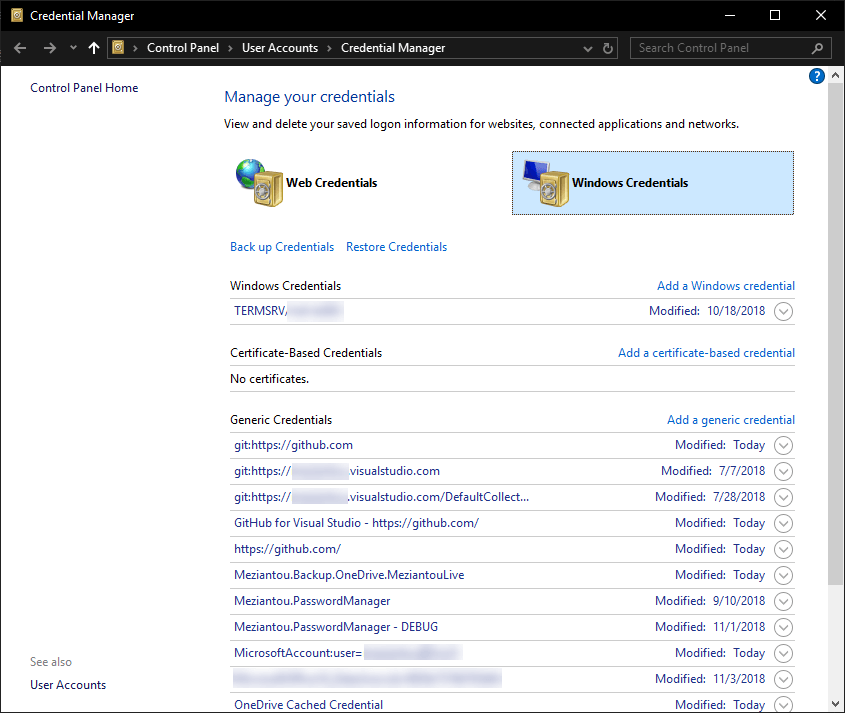 Windows Credential Manager
The Credential Manager lets you store generic credentials. A generic credential consists of an application name, a username, and a password. You can add, edit, or delete credentials using the GUI or the API. The API has 3 main methods: CredRead, CredWrite, and CredDelete. There are also methods for prompting for credentials, but those will be covered in the next post: CredUIPromptForWindowsCredentials, CredUICmdLinePromptForCredentials
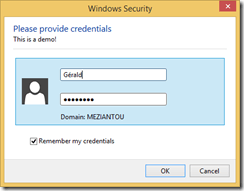 Windows created using CredUIPromptForWindowsCredentials
These methods are not directly exposed in .NET, so you need some DllImports. You can find the complete code on my GitHub repository. There is also a NuGet package: Meziantou.Framework.Win32.CredentialManager
First, you need to install the NuGet package Meziantou.Framework.Win32.CredentialManager (NuGet). Then, you can use the following code to save/read/delete credentials:
C#
// Save the credential to the credential manager
CredentialManager.WriteCredential(
    applicationName: "CredentialManagerTests",
    userName: "meziantou",
    secret: "Pa$$w0rd",
    comment: "Test",
    persistence: CredentialPersistence.LocalMachine);

// Get a credential from the credential manager
var cred = CredentialManager.ReadCredential(applicationName: "CredentialManagerTests");
Console.WriteLine(cred.UserName);
Console.WriteLine(cred.Password);

// Delete a credential from the credential manager
CredentialManager.DeleteCredential(applicationName: "CredentialManagerTests");
#UWP application or Desktop application on Windows 10
UWP exposes methods for using the credential manager. PasswordVault can be used directly in C#, JavaScript, or C++. The principle is the same, except that credentials are only accessible to the current application.
C#
// Save the credential to the credential manager
var vault = new Windows.Security.Credentials.PasswordVault();
var credential = new Windows.Security.Credentials.PasswordCredential(
    resource: "Sample Application",
    userName: "meziantou",
    password: "Pa$$w0rd");
vault.Add(credential);

// Get a credential from the credential manager
try
{
    var credential = vault.FindAllByResource(resourceName).FirstOrDefault();
    if (credential != null)
    {
        // Get the password
        return vault.Retrieve(credential.Resource, credential.UserName);
    }
}
catch
{
    // Throw an exception if no entries exist for the given resource
    // vault.Retrieve may also throw if the entry is deleted between vault.FindAllByResource and vault.Retrieve
    // More information about exceptions: https://github.com/MicrosoftDocs/winrt-api/issues/519#issuecomment-423780160
}

// Delete a credential from the credential manager
try
{
   PasswordCredential passwordCredential = vault.Retrieve(resourceName, userName);
   vault.Remove(passwordCredential);
}
catch
{
    // Throw an exception if no entries exist for the given resource
}
#Data Protection API
The Data Protection API (DPAPI) is a Windows API for encrypting and decrypting data using user or machine credentials. If you use this method, you are responsible for storing the protected data. You can store it in a file, for instance. The framework exposes this API through System.Security.Cryptography.ProtectedData, which has 2 static methods: Protect and Unprotect.
C#
var entropy = new byte[] { 0, 1, 2, 3 };
var secret = Encoding.UTF8.GetBytes("Pa$$w0rd");

// Encrypt the data
byte[] protectedData = ProtectedData.Protect(secret, entropy, DataProtectionScope.CurrentUser);

// Encrypt the data
try
{
    byte[] clearData = ProtectedData.Unprotect(protectedData, entropy, DataProtectionScope.CurrentUser);
    string decryptedPassord = Encoding.UTF8.GetString(clearData);
}
catch (CryptographicException)
{
    // The entropy is different from the one used for encryption
    // The data was not encrypted by the current user (scope == CurrentUser)
    // The data was not encrypted on this machine (scope == LocalMachine)
}
Any application running as the current user can decrypt data protected with this API. The optional entropy parameter helps prevent other applications from decrypting data protected by your application. They would need to know the entropy value used by your application, which means they would have to decompile it. While this is possible in .NET, it adds a layer of complexity. This is why you should always use entropy in your application.
Do you have a question or a suggestion about this post? Contact me!
