In a previous article, I detailed how I wrote a Boolean expression parser in response to a StackOverflow question. At the end of that article, I noted that it is better to generate parsers using dedicated tools such as ANTLR or GoldParser. In this post, we will see how to use GoldParser.
GOLD is a free parsing system that you can use to develop your programming languages, scripting languages, and interpreters. It strives to be a development tool that can be used with numerous programming languages and on multiple platforms.
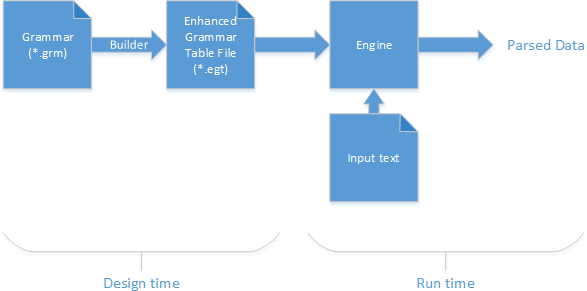
GoldParser works as follows:
- Write the grammar
- Generate analysis tables using the Builder
- At runtime, the chosen engine reads these tables and parses the input. Several engines are available to support different languages and platforms.
#Creating grammar
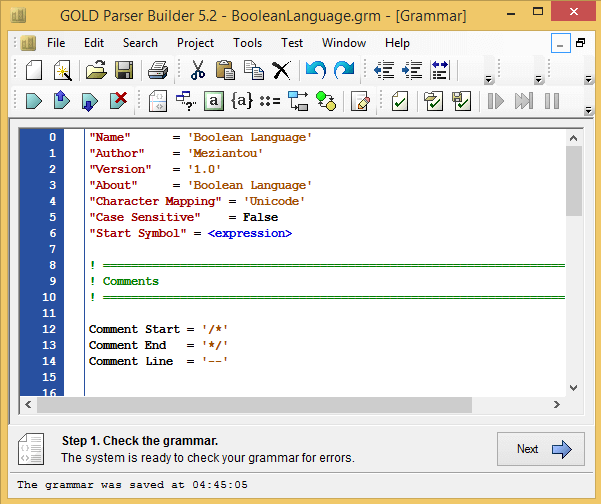
To create and test the grammar, I used GOLD Parser Builder.
The grammar begins with a preamble describing it:
"Name"      = 'Boolean Language'
"Author"    = 'Meziantou'
"Version"   = '1.0'
"About"     = 'Boolean Language'
"Character Mapping" = 'Unicode'
"Case Sensitive"    = False
"Start Symbol" = <expression>
We then define the comment format (if comments are supported):
Comment Start = '/*'
Comment End   = '*/'
Comment Line  = '--'
Then we define the terminal symbols. Terminal symbols are symbols such as integers, real numbers, strings, dates, and so on.
{Id Ch Standard} = {Alphanumeric} + [_] + [.]
{Id Ch Extended} = {Printable} + {Letter Extended} - ['['] - [']']
! Examples: Test; [A B]
Identifier = {Id Ch Standard}+ | '['{Id Ch Extended}+']'
Boolean = 'true' | 'false'
Finally, we define the rules in Backus-Naur Form (BNF):
BNF
<expression> ::=
      <andExpression>
    | <orExpression>
    | <xorExpression>
    | <subExpression>

<andExpression> ::=
      <expression> '&&' <subExpression>
    | <expression> 'and' <subExpression>

<orExpression>  ::=
      <expression> '||' <subExpression>
    | <expression> 'or' <subExpression>

<xorExpression> ::=
      <expression> '^' <subExpression>
    | <expression> 'xor' <subExpression>

<subExpression> ::=
      <parentheseExpression>
    | <notExpression>
    | <value>

<parentheseExpression> ::= '(' <expression> ')'

<notExpression> ::= '!' <subExpression>

<value> ::=
      Boolean
    | Identifier
Once the grammar is complete, we can generate the tables. The process is straightforward: click "Next" until prompted to save the generated file.
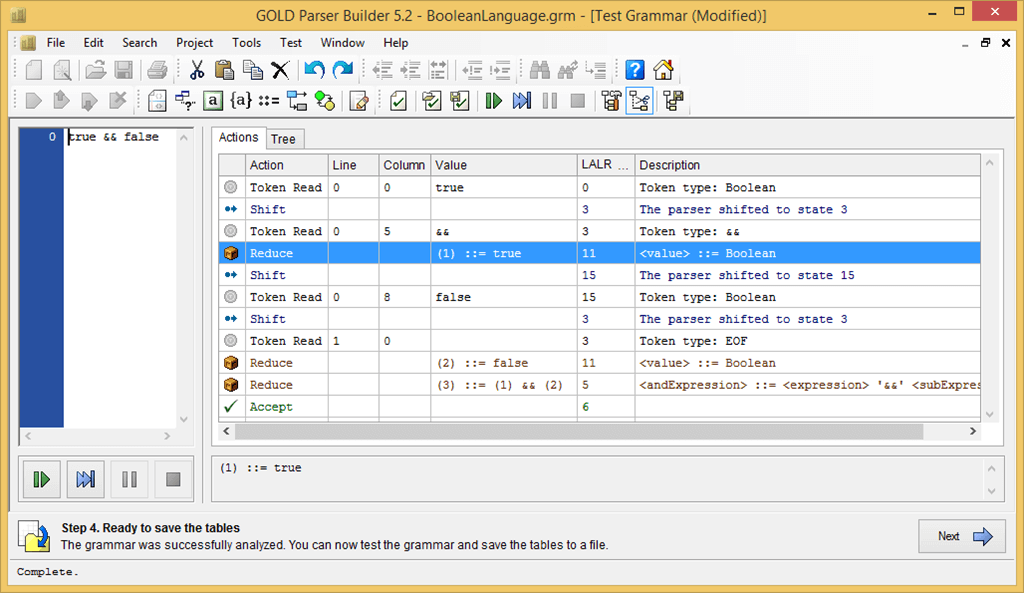
You can also test the grammar directly in the tool using the Test menu:
#Some code
First, download the .NET engine: http://goldparser.org/engine/5/net/index.htm
The code breaks down into four steps:
- Instantiate the analysis engine
- Load the analysis tables generated from the grammar
- Read the input to parse
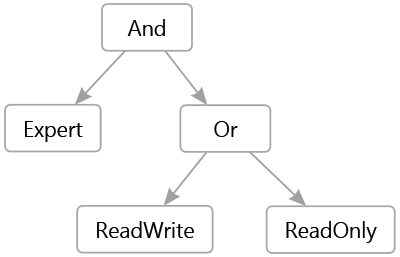
- For each matched grammar rule (Reduction step), create a corresponding object. For example, for the
<orExpression> rule, we create an OrExpression object containing the left and right expressions. When parsing completes (the Accept step), we retrieve the final object, which represents the parse tree for the input expression. For example, for the text "[Expert] && ([ReadWrite] || [ReadOnly])" the resulting tree is:
C#
// Instantiate the parser and load the grammar file
Parser parser = new Parser();
using (BinaryReader grammar = GetGrammar())
{
    parser.LoadTables(grammar);
}

using (TextReader textReader = new StringReader("true || false"))
{
    parser.Open(textReader);
    parser.TrimReductions = true;
    while (true)
    {
        // The 4 useful ParseMessage are:
        //   Reduction: A rule is matched => we can create an object with its content
        //   Accept: End of the parsing => we can get the result
        //   LexicalError and SyntaxError: The file is not valid
        ParseMessage response = parser.Parse();
        switch (response)
        {
            case ParseMessage.TokenRead:
                Trace.WriteLine("Token: " + parser.CurrentToken.Parent.Name);
                break;

            case ParseMessage.Reduction:
                parser.CurrentReduction = CreateNewObject(parser.CurrentReduction as Reduction);
                break;

            case ParseMessage.Accept:
                Expression result = parser.CurrentReduction as Expression;
                if (result != null)
                {
                Console.WriteLine(result.DisplayName);
                }
                return;

            case ParseMessage.LexicalError:
                Console.WriteLine("Lexical Error. Line {0}, Column {1}. Token {2} was not expected.",
                    parser.CurrentPosition.Line,
                    parser.CurrentPosition.Column,
                    parser.CurrentToken.Data);
                return;

            case ParseMessage.SyntaxError:
                StringBuilder expecting = new StringBuilder();
                foreach (Symbol tokenSymbol in parser.ExpectedSymbols)
                {
                    expecting.Append(' ');
                    expecting.Append(tokenSymbol);
                }

                Console.WriteLine("Syntax Error. Line {0}, Column {1}. Expecting: {2}.",
                    parser.CurrentPosition.Line,
                    parser.CurrentPosition.Column,
                    expecting);
                return;

            case ParseMessage.InternalError:
            case ParseMessage.NotLoadedError:
            case ParseMessage.GroupError:
                return;
        }
    }
}


static object CreateNewObject(Reduction r)
{
    string ruleName = r.Parent.Head.Name;
    Trace.WriteLine("Reduce: " + ruleName);
    if (ruleName == "orExpression")
    {
        var left = r.GetData(0) as Expression;
        var right = r.GetData(2) as Expression;
        return new OrExpression(left, right);
    }
    else if (ruleName == "andExpression")
    {
        var left = r.GetData(0) as Expression;
        var right = r.GetData(2) as Expression;
        return new AndExpression(left, right);
    }
    /// ...
    else if (ruleName == "value")
    {
        var value = r.GetData(0) as string;
        if (value != null)
        {
            value = value.Trim();
            bool boolean;
            if (bool.TryParse(value, out boolean))
                return new BooleanValueExpression(boolean);

            return new RoleNameExpression(value);
        }
    }
    return null;
}
The full code is available on GitHub: https://github.com/meziantou/GoldParser-Engine
Do you have a question or a suggestion about this post? Contact me!
