Microsoft recently released Library Manager. Library Manager is Visual Studio's new client-side static content management system. Designed to replace Bower and npm, it helps you find and fetch library files from an external source (such as CDNJS) or any local file system catalog.
Library Manager is open-source. You can find the source of the project on GitHub: https://github.com/aspnet/LibraryManager.
#How does it work?
In Visual Studio, you have a new contextual menu item "Manage Client-Side Libraries…":
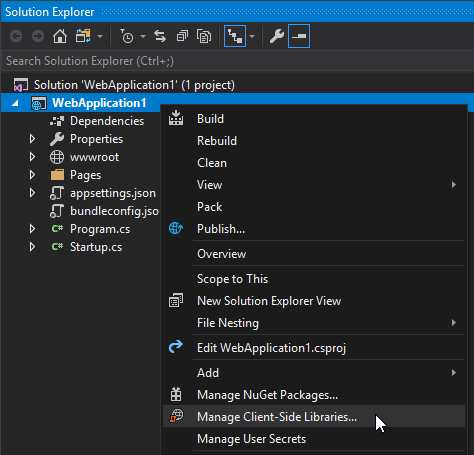
It creates a new file named libman.json. This file contains the list of libraries to download. Each entry specifies a name, a version, a list of files to download, and the destination path. Autocompletion is available for the name, version, and files.
JSON
{
  "version": "1.0",
  "defaultProvider": "cdnjs",
  "libraries": [
    {
      "library": "systemjs@0.21.2",
      "destination": "wwwroot/lib/systemjs",
      "files": [
        "system.js",
        "system.js.map"
      ]
    },
    {
      "library": "font-awesome@4.7.0",
      "destination": "wwwroot/lib/font-awesome",
      "files": [
        "css/font-awesome.min.css",
        "fonts/fontawesome-webfont.eot",
        "fonts/fontawesome-webfont.svg",
        "fonts/fontawesome-webfont.ttf",
        "fonts/fontawesome-webfont.woff",
        "fonts/fontawesome-webfont.woff2",
        "fonts/FontAwesome.otf"
      ]
    }
  ]
}
The file is easy to read and edit, especially with auto-completion. library specifies the name and version, destination is the output path, and files lists the files to download.
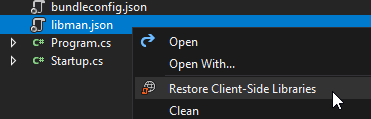
Whenever the file is saved, Visual Studio automatically restores the packages. You can also trigger this manually using the context menu:
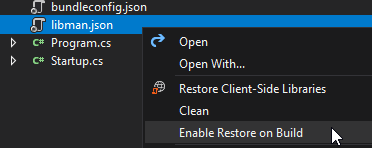
To restore libraries at build time, you can use an MSBuild task. This is useful for CI build servers or when working outside of Visual Studio. You can enable this automatically by clicking "Enable Restore on Build":
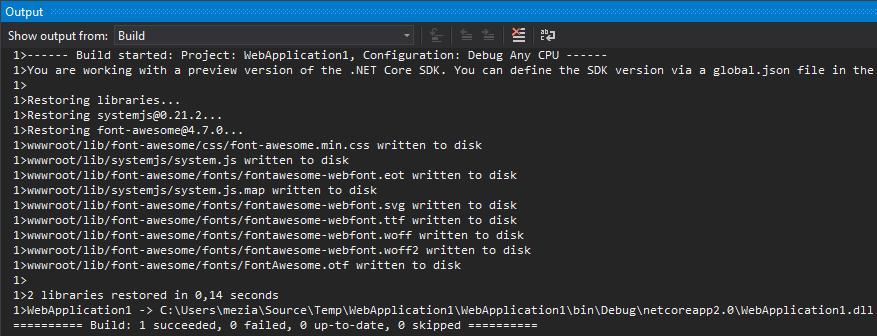
This will add the package Microsoft.Web.LibraryManager.Build to your project. Then, when you build the project, the files will be downloaded and copied to the specified destination:
Tip: You can quickly update or uninstall a library using the light bulb menu, making it easy to stay up to date:

#Why do we need this tool?
A few years ago, you would add a library such as Bootstrap using a NuGet package. While NuGet is excellent for managing DLL dependencies, it does not fit well with client-side dependencies. You cannot choose where the files are copied or which files you want; that decision is made by the package owner, leading to inconsistent folder structures. This was not ideal, so developers moved to Bower. Bower was great, but the Bower's website now recommends migrating to yarn and webpack.
If you are building a Single Page Application or a complex front-end application with npm/yarn and webpack, you likely already have everything you need to manage dependencies and do not need LibMan.
If you are building a basic website and want to add libraries such as Bootstrap or FontAwesome, you may not want to deal with Node.js and npm. npm has some drawbacks:
- npm downloads everything into
node_modules, so you need to copy the desired files to wwwroot using an MSBuild task or another Node.js-based toolchain. - npm downloads the entire package even if you only need one file, which can make the initial install slow.
- npm requires Node.js. While npm is bundled with Visual Studio, it may not be available on a build server.
Library Manager tries to address these issues:
- LibMan integrates well with the .NET ecosystem (NuGet package, Visual Studio extension). There is no need to run
npm install before building. Building the project restores both NuGet packages and library files. - LibMan is faster because it only downloads the necessary files.
- LibMan downloads files directly to
wwwroot or any path you specify, eliminating the need for a post-restore copy step.
In summary, if you are building a basic website and need a few libraries, Library Manager is a solid choice. For more complex projects such as SPAs, npm and webpack remain the better option.
Do you have a question or a suggestion about this post? Contact me!
