This post is part of the series 'MSTest v2'. Be sure to check out the rest of the blog posts of the series!
In the previous post, we created a simple test and ran it. Tests verify that your code behaves as expected, which makes assertions central to unit testing in any framework. MSTest is no exception and provides a rich set of assertions. In this post, we explore the Assert classes.
An assertion method takes parameters and ensures a condition is met. For instance, AreEqual takes 2 values and checks that they are equal. If an assertion fails, the method throws an exception with a formatted message and the test stops. Any assertions that follow the failing one are not executed.
C#
[TestMethod]
public void Test()
{
    Assert.AreEqual(10, 5 + 5); // Success
    Assert.AreEqual(10, 1 + 2); // 10 ≠ 3 => Error.
    Assert.AreEqual(20, 1 + 2); // Not executed
}
Now, we can explore the different assert methods of the framework.
#Assertion on a single value
The following assert methods validate that a value meets a specific condition. Most are self-explanatory, so I will only highlight a few.
Assert.AreEqual(object expected, object actual): Tests whether the specified values are equal. Different numeric types are treated as unequal even if the logical values are equal. 42L is not equal to 42.Assert.AreNotEqual(object expected, object actual): Tests whether the specified values are unequal. Same as AreEqual for numeric values.Assert.AreSame(object expected, object actual): Tests whether the specified objects both refer to the same objectAssert.AreNotSame(object expected, object actual): Tests whether the specified objects refer to different objectsAssert.IsTrue(bool condition): Tests whether the specified condition is trueAssert.IsFalse(bool condition): Tests whether the specified condition is falseAssert.IsNull(object value): Tests whether the specified object is nullAssert.IsNotNull(object value): Tests whether the specified object is non-nullAssert.IsInstanceOfType(object value, Type type): Tests whether the specified object is an instance of the expected typeAssert.IsNotInstanceOfType(object value, Type type): Tests whether the specified object is not an instance of the wrong typeStringAssert.Contains(string value, string substring): Tests whether the specified string contains the specified substringStringAssert.StartsWith(string value, string substring): Tests whether the specified string begins with the specified substringStringAssert.Matches(string value, Regex regex): Tests whether the specified string matches a regular expressionStringAssert.DoesNotMatch(string value, Regex regex): Tests whether the specified string does not match a regular expression
Only AreEqual and AreSame warrant an example, as their difference is subtle.
C#
var expected = "a";
var actual = "a";

Assert.AreEqual(expected, actual);    // success
Assert.AreSame(expected, actual);     // fail

Assert.AreNotEqual(expected, actual); // fail
Assert.AreNotSame(expected, actual);  // success

Assert.AreEqual(42, 42);              // success
Assert.AreEqual(42, 42L);             // fail
#Assertion on collections
CollectionAssert.AreEqual(ICollection expected, ICollection actual): Tests whether the specified collections have the same elements in the same order and quantity.CollectionAssert.AreNotEqual(ICollection expected, ICollection actual): Tests whether the specified collections do not have the same elements, or the elements are in a different order or quantity.CollectionAssert.AreEquivalent(ICollection expected, ICollection actual): Tests whether two collections contain the same elements.CollectionAssert.AreNotEquivalent(ICollection expected, ICollection actual): Tests whether two collections contain different elements.CollectionAssert.AllItemsAreInstancesOfType(ICollection collection, Type expectedType): Tests whether all elements in the specified collection are instances of the expected typeCollectionAssert.AllItemsAreNotNull(ICollection collection): Tests whether all items in the specified collection are non-nullCollectionAssert.AllItemsAreUnique(ICollection collection): Tests whether all items in the specified collection are uniqueCollectionAssert.Contains(ICollection collection, object element): Tests whether the specified collection contains the specified elementCollectionAssert.DoesNotContain(ICollection collection, object element): Tests whether the specified collection does not contain the specified elementCollectionAssert.IsSubsetOf(ICollection subset, ICollection superset): Tests whether one collection is a subset of another collectionCollectionAssert.IsNotSubsetOf(ICollection subset, ICollection superset): Tests whether one collection is not a subset of another collection
Here's an example to show the difference between AreEqual and AreEquivalent:
C#
CollectionAssert.AreEqual(new [] { 1, 2 }, new [] { 1, 2 });    // success
CollectionAssert.AreEqual(new [] { 1, 2 }, new [] { 1, 2, 3 }); // fail
CollectionAssert.AreEqual(new [] { 1, 2 }, new [] { 2, 1 });    // fail

CollectionAssert.AreEquivalent(new [] { 1, 2 }, new [] { 1, 2 });    // success
CollectionAssert.AreEquivalent(new [] { 1, 2 }, new [] { 1, 2, 3 }); // fail
CollectionAssert.AreEquivalent(new [] { 1, 2 }, new [] { 2, 1 });    // success
#Test an exception is thrown
Assert.ThrowsException<T>(Action action): Tests whether the code specified by delegate throws an exception of type T (and not of derived type)Assert.ThrowsExceptionAsync<T>(Func<Task> action): Same as ThrowsException with async code
C#
// success
Assert.ThrowsException<ArgumentNullException>(() => new Regex(null));

// fail
Assert.ThrowsException<ArgumentException>(() => new Regex(null));
#Other asserts
The following assert methods are special. Fail immediately changes the test status to error, which is useful when writing custom assert methods. Inconclusive indicates that the test could not be completed; the test is neither a success nor a failure.
Assert.Fail(string message)Assert.Inconclusive(string message)
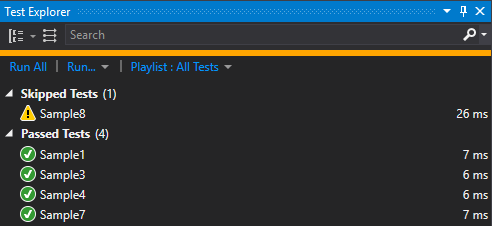
Here's an example of an inconclusive test
C#
[TestMethod]
public void Sample8()
{
    if (DateTime.Now.Hour != 12)
        Assert.Inconclusive("Must be executed at noon");

    // actual tests...
}
In the test explorer, inconclusive tests are grouped into "Skipped Tests":
#Conclusion
MSTest v2 comes with more than 30 assert methods, covering most testing scenarios out of the box. In a future post, we will see how to extend the list with custom assert methods.
Do you have a question or a suggestion about this post? Contact me!
