This post is part of the series 'Roslyn Analyzers'. Be sure to check out the rest of the blog posts of the series!
Roslyn Analyzers are distributed as NuGet packages. If you are new to Roslyn Analyzers, check out the previous posts in this series.
If your Roslyn analyzer depends on another NuGet package, you need to customize how it is packaged. By default, adding a <PackageReference> to your project is not enough: Roslyn cannot resolve the referenced package at runtime, and you will see the following warning:
CSC: warning AD0001: Analyzer 'SampleAnalyzer.MyAnalyzer' threw an exception of type 'System.IO.FileNotFoundException' with message 'Could not load file or assembly 'Meziantou.Framework.CodeDom, Version=4.0.2.0, Culture=neutral, PublicKeyToken=null'. The system cannot find the file specified.'. [C:\Users\meziantou\MyApp.csproj]
The fix is to place the DLLs from referenced NuGet packages alongside the analyzer DLL in the package. The NuGet package must include all required DLLs:
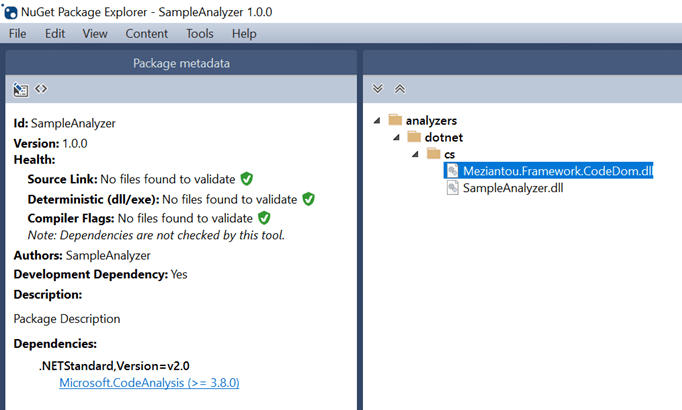
Update your .csproj to include the referenced DLLs at the correct location within the package:
csproj (MSBuild project file)
<Project Sdk="Microsoft.NET.Sdk">
  <PropertyGroup>
    <TargetFramework>netstandard2.0</TargetFramework>
    <Version>1.0.0</Version>

    <developmentDependency>true</developmentDependency>
    <GeneratePackageOnBuild>false</GeneratePackageOnBuild>
    <IncludeBuildOutput>false</IncludeBuildOutput>
    <NoPackageAnalysis>true</NoPackageAnalysis>
  </PropertyGroup>

  <ItemGroup>
    <PackageReference Include="Microsoft.CodeAnalysis" Version="3.8.0" />

    <!-- 👇 Reference a NuGet package and use PrivateAssets="All" to prevent adding the NuGet dependency when creating the package. -->
    <PackageReference Include="Meziantou.Framework.CodeDom" Version="4.0.2" PrivateAssets="All"
                      IncludeInPackage="true" />
  </ItemGroup>

  <!-- 👇 Add a new target that runs before the task that lists all the files to include in the NuGet package.
          This task must run after the packages resolution target -->
  <Target Name="AddNuGetDlls" BeforeTargets="_GetPackageFiles">
      <!-- Merge the collection of PackageReference and Assemblies using the NuGetPackageId key.
           This produces a new list containing the DLL path and the "IncludeInPackage" metadata-->
    <JoinItems Left="@(ResolvedCompileFileDefinitions)" LeftKey="NuGetPackageId" LeftMetadata="*"
               Right="@(PackageReference)" RightKey="" RightMetadata="*"
               ItemSpecToUse="Left">
      <Output TaskParameter="JoinResult" ItemName="_PackagesToPack" />
    </JoinItems>

    <ItemGroup>
      <!-- Remove NETStandard DLLs -->
      <_PackagesToPack Remove="@(_PackagesToPack)" Condition="%(NuGetPackageId) == 'NETStandard.Library'" />
      <_PackagesToPack Remove="@(_PackagesToPack)" Condition="%(_PackagesToPack.IncludeInPackage) != 'true'" />
    </ItemGroup>

    <Message Importance="High" Text="Adding DLLs from the following packages: @(_PackagesToPack->'%(NuGetPackageId)')" />

    <ItemGroup>
      <!-- Update the collection of items to pack with the DLLs from the NuGet packages -->
      <None Include="@(_PackagesToPack)"
            Pack="true"
            PackagePath="analyzers/dotnet/cs"
            Visible="false" />

      <!-- Add the DLL produced by the current project to the NuGet package -->
      <None Include="$(OutputPath)\$(AssemblyName).dll"
            Pack="true"
            PackagePath="analyzers/dotnet/cs"
            Visible="false" />
    </ItemGroup>
  </Target>
</Project>
Your package now includes all required DLLs, so Roslyn can load them. Note that if multiple analyzers reference the same package at different versions, you may encounter errors at runtime. One solution is to use ILRepack to merge assemblies and eliminate the dependency.
Do you have a question or a suggestion about this post? Contact me!
