This post is part of the series 'Vulnerabilities'. Be sure to check out the rest of the blog posts of the series!
.NET regexes are very powerful and support complex patterns for matching a wide range of inputs. But they also come with potential pitfalls (source xkcd):

Some patterns require significantly more resources to match certain strings. For instance, the following regex, which was used to validate email addresses in an older version of the .NET Framework, can take several minutes to process certain crafted inputs:
C#
// ⚠ Do not use this regex in your application
// This regex **was** part of the .NET Framework
var regex = new Regex(
               @"^((([a-z]|\d|[!#\$%&'\*\+\-\/=\?\^_`{\|}~]|[\u00A0-\uD7FF\uF900-\uFDCF\uFDF0-\uFFEF])+(\.([a-z]|\d|[!#\$%&'\*\+\-\/=\?\^_`{\|}~]|[\u00A0-\uD7FF\uF900-\uFDCF\uFDF0-\uFFEF])+)*)|((\x22)((((\x20|\x09)*(\x0d\x0a))?(\x20|\x09)+)?(([\x01-\x08\x0b\x0c\x0e-\x1f\x7f]|\x21|[\x23-\x5b]|[\x5d-\x7e]|[\u00A0-\uD7FF\uF900-\uFDCF\uFDF0-\uFFEF])|(\\([\x01-\x09\x0b\x0c\x0d-\x7f]|[\u00A0-\uD7FF\uF900-\uFDCF\uFDF0-\uFFEF]))))*(((\x20|\x09)*(\x0d\x0a))?(\x20|\x09)+)?(\x22)))@((([a-z]|\d|[\u00A0-\uD7FF\uF900-\uFDCF\uFDF0-\uFFEF])|(([a-z]|\d|[\u00A0-\uD7FF\uF900-\uFDCF\uFDF0-\uFFEF])([a-z]|\d|-|\.|_|~|[\u00A0-\uD7FF\uF900-\uFDCF\uFDF0-\uFFEF])*([a-z]|\d|[\u00A0-\uD7FF\uF900-\uFDCF\uFDF0-\uFFEF])))\.)+(([a-z]|[\u00A0-\uD7FF\uF900-\uFDCF\uFDF0-\uFFEF])|(([a-z]|[\u00A0-\uD7FF\uF900-\uFDCF\uFDF0-\uFFEF])([a-z]|\d|-|\.|_|~|[\u00A0-\uD7FF\uF900-\uFDCF\uFDF0-\uFFEF])*([a-z]|[\u00A0-\uD7FF\uF900-\uFDCF\uFDF0-\uFFEF])))\.?$",
               RegexOptions.IgnoreCase | RegexOptions.ExplicitCapture);

// Takes more than 30s om my computer
regex.IsMatch("t@t.t.t.t.t.t.t.t.t.t.t.t.t.t.t.t.t.t.t.t.t.t.t.t.t.c%20");
The problem with this regex is its execution complexity due to backtracking. You can reproduce the issue with a simpler regex: (a+)+b. When matching aaaaaaaab, there are many ways to satisfy (a+)+ (256 combinations, doubling with each additional "a"). The regex engine may need to try all of them, which takes a long time. The execution time grows exponentially with the input size. This website explains backtracking in detail. You can also check this Cloudflare post-mortem.
If you use a vulnerable regex in your web application, a malicious user can exhaust your CPU by sending a few requests with a crafted input. This can slow down or make your website inaccessible. You can mitigate this attack by specifying a timeout for the regex execution.
C#
var regex = new Regex(
    @"...",
    RegexOptions.IgnoreCase | RegexOptions.ExplicitCapture,
    TimeSpan.FromSeconds(1)); // 👈 Set the maximum execution time for the Regex

try
{
    regex.IsMatch("...");
}
catch (RegexMatchTimeoutException)
{
    // handle the error
}
You can also apply the timeout globally using an app domain variable:
C#
AppDomain domain = AppDomain.CurrentDomain;
domain.SetData("REGEX_DEFAULT_MATCH_TIMEOUT", TimeSpan.FromSeconds(1));
Adding a timeout prevents the regex from running too long. However, you should also consider simplifying the pattern. When possible, avoid:
- Grouping with repetition
- Inside the repeated group:
- Repetition
- Alternation with overlapping (e.g.
(a|aa)+)
In modern versions of .NET, you can also use RegexOptions.NonBacktracking. This mode avoids backtracking and guarantees linear-time processing based on the input length, which prevents catastrophic backtracking.
C#
var regex = new Regex(
    @"...",
    RegexOptions.IgnoreCase | RegexOptions.ExplicitCapture | RegexOptions.NonBacktracking,
    TimeSpan.FromSeconds(1));
RegexOptions.NonBacktracking is not compatible with every advanced regex construct, so validate your pattern when enabling it.
You should also consider replacing the regex with a simple text parser. For example, Microsoft replaced the previous regex with a straightforward check that is sufficient for most cases:
C#
// https://github.com/dotnet/runtime/blob/master/src/libraries/System.ComponentModel.Annotations/src/System/ComponentModel/DataAnnotations/EmailAddressAttribute.cs
bool found = false;
for (int i = 0; i < valueAsString.Length; i++)
{
    if (valueAsString[i] == '@')
    {
        if (found || i == 0 || i == valueAsString.Length - 1)
            return false;

        found = true;
    }
}

return found;
This approach is very fast and not susceptible to crafted inputs. Only the length of the string affects validation time.
#Getting warnings in the IDE using a Roslyn Analyzer
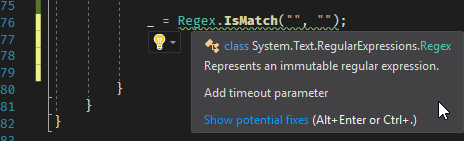
You can detect unsafe regex usage in your application with a Roslyn analyzer. The free analyzer I built already includes rules for this: https://github.com/meziantou/Meziantou.Analyzer.
You can install the Visual Studio extension or the NuGet package to analyze your code:
#Conclusion
Regexes are very powerful, but that power comes with responsibility. Be careful when writing regexes to avoid introducing a Regular Expression Denial of Service (ReDoS) vulnerability. As explained in this post, avoiding patterns that rely on excessive backtracking is key.
Do you have a question or a suggestion about this post? Contact me!
