Recently I answered a question on Stack Overflow. The question is: how do you execute a SQL batch containing "GO" in C#? For example, how do you run this batch:
SQL
SET ANSI_NULLS ON
GO
SET QUOTED_IDENTIFIER ON
GO
ALTER PROCEDURE [dbo].[Company_LoadAll]
AS
SET NOCOUNT ON
SELECT  [Company].[Company_Id]
FROM [Company]
RETURN
GO
Running this script through SQL Server Management Studio works fine. However, when using a SqlCommand, the exception System.Data.SqlClient.SqlException with the message "Incorrect syntax near 'GO'" is thrown.
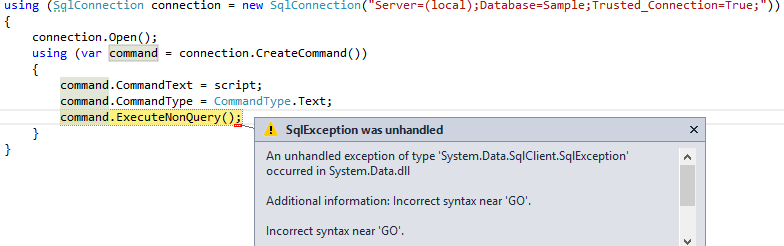
The idea is to split the script on each "GO" and execute the commands one by one. This sounds simple using string.Split, but SQL is complex and there are many edge cases to handle. For example, multi-line comments may contain "GO" that are not command separators:
SQL
/*
GO
*/
#ScriptDom
Writing a complete T-SQL parser is a very tedious task, but Microsoft provides one 😃. After referencing Microsoft.SqlServer.TransactSQL.ScriptDom, you can use the following code:
C#
using (TextReader reader = new StringReader(script))
{
    TSqlParser parser = new TSql110Parser(true);
    IList<ParseError> errors;
    TSqlFragment fragment = parser.Parse(reader, out errors);
    if (errors != null && errors.Count > 0)
    {
        foreach (ParseError error in errors)
        {
            Console.WriteLine("Line: {0}, Column: {1}: {2}", error.Line, error.Column, error.Message);
            return;
        }
    }

    SqlScriptGenerator sqlScriptGenerator = new Sql110ScriptGenerator();
    TSqlScript sqlScript = fragment as TSqlScript;
    if (sqlScript == null)
    {
        sqlScriptGenerator.GenerateScript(fragment, Console.Out); // TODO execute the script
    }
    else
    {
        foreach (var sqlBatch in sqlScript.Batches)
        {
            Console.WriteLine("-- ");
            sqlScriptGenerator.GenerateScript(sqlBatch, Console.Out); // TODO execute the script
        }
    }
}
Note that for other use cases, you can traverse the script content using a visitor (TSqlFragmentVisitor). The only drawback of this method is that comments are removed.
#CodeFluent.Runtime.Database
CodeFluent.Runtime.Database also lets you run this kind of script. Not all edge cases are handled, but it works well in most scenarios:
C#
using (StatementReader statementReader = new CodeFluent.Runtime.Database.Management.StatementReader("GO", Environment.NewLine, inputStream))
{
    Statement statement;
    while ((statement = statementReader.Read(StatementReaderOptions.Default)) != null)
    {
        Console.WriteLine("-- ");
        Console.WriteLine(statement.Command);
    }
}
The code is concise and not tied to SQL Server. You can use a different separator by changing the first parameter of the StatementReader constructor.
#SQL Server Management Objects
One last way is to use SQL Server Management Objects (SMO). First, the following references must be added:
Microsoft.SqlServer.SmoMicrosoft.SqlServer.ConnectionInfoMicrosoft.SqlServer.Management.Sdk.Sfc
Then these few lines are enough:
C#
using (SqlConnection connection = new SqlConnection("Server=(local);Database=Sample;Trusted_Connection=True;"))
{
    ServerConnection svrConnection = new ServerConnection(connection);
    Server server = new Server(svrConnection);
    server.ConnectionContext.ExecuteNonQuery(script);
}
Do you have a question or a suggestion about this post? Contact me!
