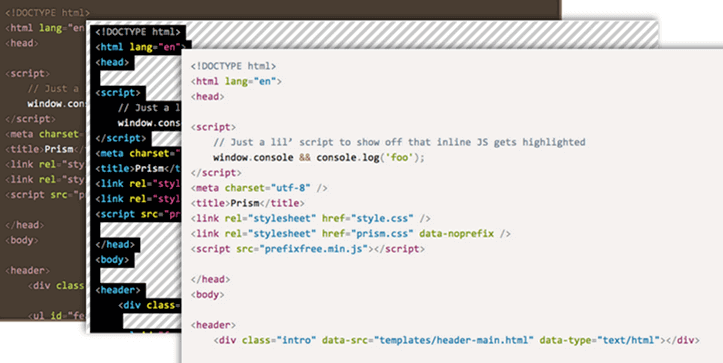
As authors of technical articles, we often need to include code in blog posts. In this post, I'll share the solution we chose.
Our requirements are as follows:
- The code must not be syntax-highlighted in the source: it will be formatted automatically when rendered. This lets us maintain a consistent style throughout the blog and change the theme globally if needed.
- The code must be easily editable within the post: we mainly use Windows Live Writer for writing posts, so the code must be easy to edit in that tool.
- The code should be displayed correctly on the blog and in the RSS feed (especially in Feedly).
The target HTML to display code is:
HTML
<pre><code class="language-csharp">public void Sample() { }</code></pre>
This format is the one defined in the HTML5 spec and is used by many editing and formatting tools such as CommonMark.
To format this HTML in the browser, we chose Prismjs because it is:
- Small and easy to integrate
- Beautiful default rendering
- Supports many languages: C#, HTML, JS, XML, SQL, etc.
- Supports extensions to customize the display: highlight specific lines, display language name, automatic link creation, etc.
#Adding code with Windows Live Writer
This is the most complicated part. Windows Live Writer is designed for writing text, and it has no built-in "code" button. Fortunately, Windows Live Writer is extensible. Four types of extensions are available:
- Add/Edit simple text,
- Add/Edit advanced text (what we chose),
- Adding a Header / Footer,
- Interception of sending the post to the blog.
So we wrote an extension to enter code and generate the HTML above. Here is how the extension works:
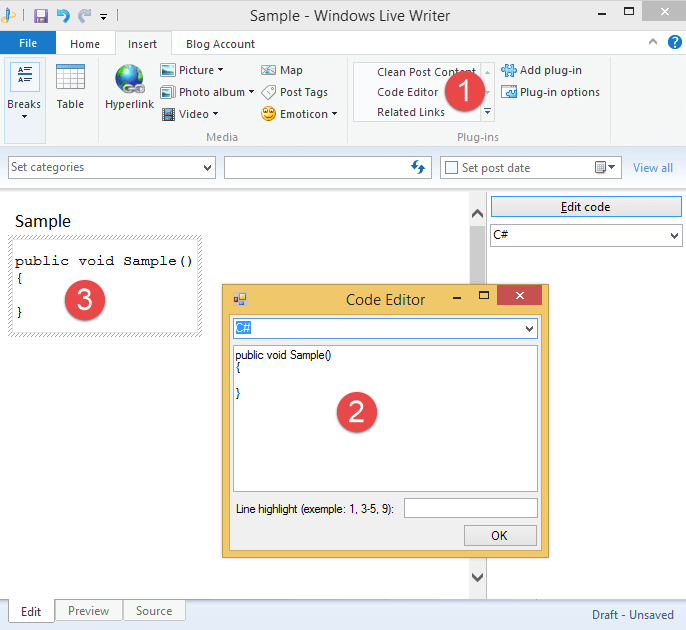
The extension adds a "Code Editor" button in the extensions menu. When clicked, a window opens to enter the code, and a block is inserted into the article. An important detail: the block is editable only through the extension, ensuring the HTML is never accidentally modified and the code always remains correctly formatted.
A usable version of the extension is available on GitHub. (Note: this is a simplified version of the extension we use)
#Conclusion
The chosen solution is not specific to any particular blog platform, so you can use it regardless of your platform (WordPress, BlogEngine.NET, Ghost, etc.). The only thing you need to integrate into your blog is Prism.js (a CSS and a JS file). For writing posts, install the plugin. In short, you can be up and running in about 10 minutes!
Do you have a question or a suggestion about this post? Contact me!
