The hierarchyid type was introduced with SQL Server 2008. It is used to represent and manipulate hierarchical data. Hierarchical data captures the notion of parent/child relationships as well as ordering among elements that share the same parent. Values of this type are stored in binary form, for example 0x5AC0 or 0x58, but in practice string representations are used, such as '/' for the root or '/1/' for a child of the root node, and so on:
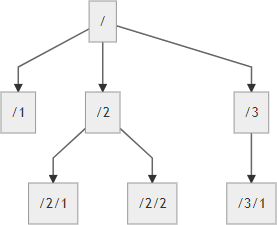
This article covers the main operations available with this data type.
#Creating the table
Creating a hierarchyid column is similar to any other simple data types:
SQL
CREATE TABLE [dbo].[Employee] (
    [Id] [int] IDENTITY(1,1) NOT NULL,
    [FirstName] [nvarchar](50) NOT NULL,
    [LastName] [nvarchar](50) NOT NULL,
    [hid] [hierarchyid] NOT NULL,
)
This type can also be used as a key:
SQL
CREATE TABLE [dbo].[Employee](
    [Id] [hierarchyid] NOT NULL,
    [FirstName] [nvarchar](50) NOT NULL,
    [LastName] [nvarchar](50) NOT NULL
)
#Inserting data
As mentioned earlier, there are several methods for working with the hierarchyid type. To create a hierarchyid value, you can use:
hierarchyid::Parse('/1/1')CAST('/1/' AS hierarchyid) <=> hierarchyid::Parse('/1/')hierarchyid::GetRoot() <=> hierarchyid::Parse('/')
To insert a row in the table we can use one of the following commands:
SQL
INSERT INTO Employee (FirstName, LastName, hid)
VALUES ('John', 'Doe', '/') -- implicit conversion to hierarchyid

INSERT INTO Employee (FirstName, LastName, hid)
VALUES ('John', 'Doe', hierarchyid::GetRoot())

INSERT INTO Employee(FirstName, LastName, hid)
VALUES ('John', 'Doe', hierarchyid::Parse('/1/'))

INSERT INTO Employee(FirstName, LastName, hid)
VALUES ('John', 'Doe', CONVERT('/1/' as hierarchyid))
#ToString
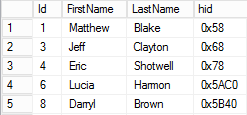
Because the hierarchyid type is stored in binary form, the result of the SELECT command is not very readable:
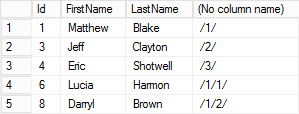
To make the result readable by a human, use the ToString method:
SQL
SELECT [Id], [FirstName], [LastName], [hid].ToString()
FROM [Employee]
#Comparing and sorting
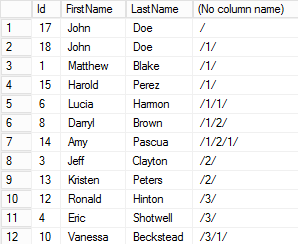
Comparison between two hierarchyid values works as follows: given values a and b, a < b means a comes before b in a depth-first traversal of the tree. This ordering is intuitive and makes it easy to sort data:
SQL
SELECT [Id], [FirstName], [LastName], [hid].ToString()
FROM [Employee]
ORDER BY [hid]
#GetDescendant
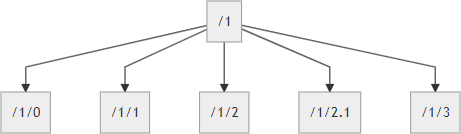
The GetDescendant method is used to create a hierarchyid corresponding to a child of another hierarchyid. It takes two arguments to specify the position of the new child. You can place the child to the left of an existing child, to the right, or between two children:
SQL
-- Create the first child of /1/ => /1/1/
SELECT CAST('/1/' AS hierarchyid).GetDescendant(NULL, NULL).ToString()

-- Create a child of /1/ after the child /1/1/ => /1/2/
SELECT CAST('/1/' AS hierarchyid).GetDescendant(CAST('/1/1/' AS hierarchyid), NULL).ToString()

-- Create a child of /1/ before the child /1/1/ => /1/0/
SELECT CAST('/1/' AS hierarchyid).GetDescendant(NULL, CAST('/1/1/' AS hierarchyid)).ToString()

-- Create a child of /1/ between the child /1/2/ and the child /1/3/ => /1/2.1/
SELECT CAST('/1/' AS hierarchyid).GetDescendant(CAST('/1/2/' AS hierarchyid), CAST('/1/3/' AS hierarchyid)).ToString()
Here's the final hierarchy:
#GetLevel
The GetLevel method allows you to know the depth of the element in the tree:
SQL
SELECT CAST('/' AS hierarchyid).GetLevel()       -- 0
SELECT CAST('/1/' AS hierarchyid).GetLevel()     -- 1
SELECT CAST('/1/1/' AS hierarchyid).GetLevel()   -- 2
SELECT CAST('/1/1.0/' AS hierarchyid).GetLevel() -- 2
Recall the previous article on recursive CTEs that displayed a sorted, indented listing. With the hierarchyid type, the query is much simpler:
SQL
SELECT REPLICATE('--', hid.GetLevel()) + FirstName + ' ' + LastName, hid.ToString()
FROM Employee
ORDER BY hid

#IsDescendantOf
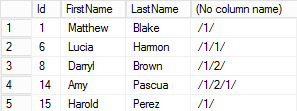
The IsDescendantOf method returns whether a node is a descendant of another node (not just a direct child). This query retrieves all items whose parent or ancestor is /1/:
SQL
SELECT [Id], [FirstName], [LastName], [hid].ToString()
FROM [Employee]
WHERE [hid].IsDescendantOf(CAST('/1/' AS hierarchyid)) = 1
#GetAncestor
The GetAncestor method is used to create a hierarchyid corresponding to the specified parent level:
SQL
SELECT CAST('/1/2/3.5/' AS hierarchyid).GetAncestor(0).ToString()
 -- /1/2/3.5/

 SELECT CAST('/1/2/3.5/' AS hierarchyid).GetAncestor(1).ToString()
 -- /1/2/

 SELECT CAST('/1/2/3.5/' AS hierarchyid).GetAncestor(2).ToString()
 -- /1/

 SELECT CAST('/1/2/3.5/' AS hierarchyid).GetAncestor(3).ToString()
 -- /

 SELECT CAST('/1/2/3.5/' AS hierarchyid).GetAncestor(4).ToString()
 -- NULL
#Select all ancestors of an element
The first (but not the best) query that comes to mind to answer this problem is a recursive CTE:
SQL
WITH Ancestors(Id, FirstName, LastName, AncestorId)
AS
(
    SELECT Id, FirstName, LastName, hid.GetAncestor(1)
    FROM Employee
    WHERE hid = '/1/2/1/'

    UNION ALL

    SELECT e.Id, e.FirstName, e.LastName, e.hid.GetAncestor(1)
    FROM Employee e
    INNER JOIN Ancestors a
          ON e.hid = a.AncestorId
)
SELECT FirstName, LastName, AncestorId.ToString() FROM Ancestors
By rephrasing the question, a simpler query emerges: select all elements for which the target node is a descendant:
SQL
SELECT Id, FirstName, LastName, hid.ToString()
FROM Employee
WHERE CAST('/1/2/1/' as hierarchyid).IsDescendantOf(hid) = 1
There is always more than one way to get to the result… But some are simpler than others 😃
#GetReparentedValue
The GetReparentedValue method is used to move an item in the tree.
SQL
DECLARE @employee as hierarchyid = '/1/1/3/'
DECLARE @oldparent as hierarchyid = '/1/1/'
DECLARE @newparent as hierarchyid = '/1/2/'

SELECT @employee.GetReparentedValue(@oldparent, @newparent).ToString()
-- /1/2/3/
To move a subtree we can use the following query:
SQL
DECLARE @nold hierarchyid = CAST('/1/' as hierarchyid) -- sub-tree to move
DECLARE @nnew hierarchyid = CAST('/2/' as hierarchyid) -- new parent

-- We want to move the tree under @nnew, after all its children
-- Compute the value of the new hierarchyid
SELECT @nnew = @nnew.GetDescendant(max(hid), NULL)
FROM Employee
WHERE hid.GetAncestor(1) = @nnew;

-- Update the children of @nold
UPDATE Employee
SET hid = hid.GetReparentedValue(@nold, @nnew)
WHERE hid.IsDescendantOf(@nold) = 1;
To avoid issues, these statements should be wrapped in a transaction.
#Avoid nodes without a parent
The hierarchyid type represents a position in a hierarchy but does not guarantee that an element has a direct parent. The following statements execute without error:
SQL
CREATE TABLE Employee
(
    Id hierarchyid NOT NULL PRIMARY KEY,
    Name nvarchar(50) NOT NULL,
)
GO

INSERT INTO Employee(Id, Name) VALUES ('/', 'John')
INSERT INTO Employee(Id, Name) VALUES ('/1/', 'Jane')
INSERT INTO Employee(Id, Name) VALUES ('/1/1/', 'Jeff')
DELETE FROM Employee WHERE Id = CAST('/1/' AS hierarchyid) -- No error
If your data model requires every node to have a parent (except the root), you can enforce this by adding a computed, persisted column for the node's parent using GetAncestor(1). A foreign key from this column back to Id then enforces referential integrity:
SQL
CREATE TABLE Employee
(
    Id hierarchyid NOT NULL PRIMARY KEY,
    Name nvarchar(50) NOT NULL,
    ManagerId AS Id.GetAncestor(1) PERSISTED REFERENCES Employee(Id),
)
GO

INSERT INTO Employee(Id, Name) VALUES ('/', 'John')
INSERT INTO Employee(Id, Name) VALUES ('/2/', 'Jane')
INSERT INTO Employee(Id, Name) VALUES ('/2/1/', 'Jeff')
DELETE FROM Employee WHERE Id = CAST('/2/' AS hierarchyid) -- Error
#Conclusion
We have now covered the main methods of the hierarchyid type. It can simplify many queries, but it is important to understand its limitations. One limitation is size: although values can be up to 892 bytes, this is finite and cannot represent arbitrarily deep hierarchies. Other approaches exist, such as interval tree representation or closure tables. Choose the one that best fits your needs.
Do you have a question or a suggestion about this post? Contact me!
