
This keynote was presented by Jeffrey Snover. You can find the webcast of this conference on Channel9.
Users of Windows Server, including Microsoft itself with Azure, had common complaints:
- Mandatory reboots caused by updates for components they don't even use
- Large Windows images consuming more disk space (including for backups) and more bandwidth during VM migrations
- Unnecessary components increasing the attack surface
Microsoft had already started to address this with Windows Server Core, introduced in 2008 and improved in later versions, but it wasn't enough.
With Windows Server 2016, Microsoft introduced Windows Server Nano. It is an installation option (like Core) and not a new SKU. This version contains only the bare minimum needed to run. There is no GUI (except the login screen and a very basic configuration screen), the installation DVD content is no longer present on disk, and only the necessary drivers are installed. The image is just 400 MB, compared to 5.42 GB for the full version.
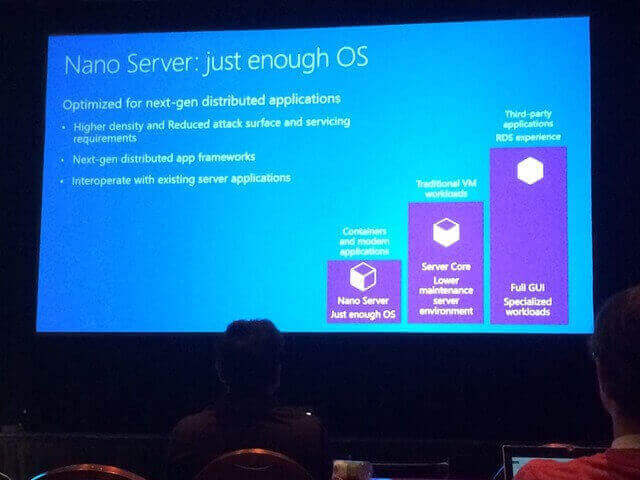
Currently (CTP3), a few roles are supported: Hyper-V, Storage, Clustering, IIS, and DNS. The .NET Framework is not supported; only Core CLR is. The application installation mechanism has also changed: MSI is no longer supported and has been replaced by WSI (Windows Server Installation), which is based on scripts (likely PowerShell).
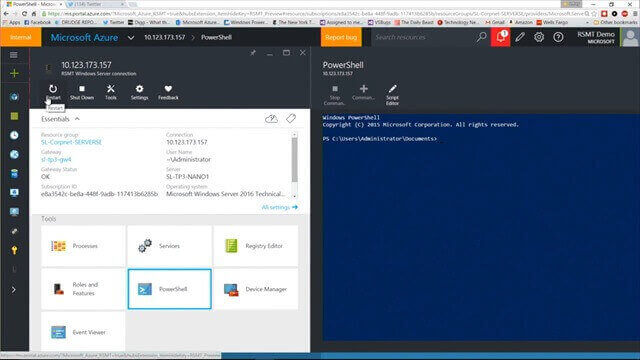
Regarding administration, everything (or almost everything) is done remotely from another machine via PowerShell or Server Manager (GUI). PowerShell continues to evolve to make remote management easier: simplified connections to remote machines, file transfers between machines, debugging scripts running on a remote machine, and more. Operations can also be performed from Azure:
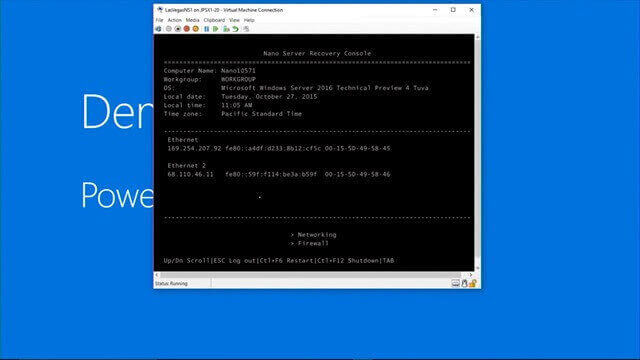
The only remaining GUI provides a command-line interface for emergency recovery and basic configuration, such as network settings and domain joining.
Feel free to watch the Nano Server team videos on Channel9.
Do you have a question or a suggestion about this post? Contact me!
