Let's Encrypt is a free, automated, and open Certificate Authority that lets you obtain an SSL certificate for your domain at no cost. The process is straightforward and you can get a certificate in minutes, though ASP.NET Core requires a small amount of extra configuration.
First, you need to download letsencrypt-win-simple and copy it on the server. Then execute it:
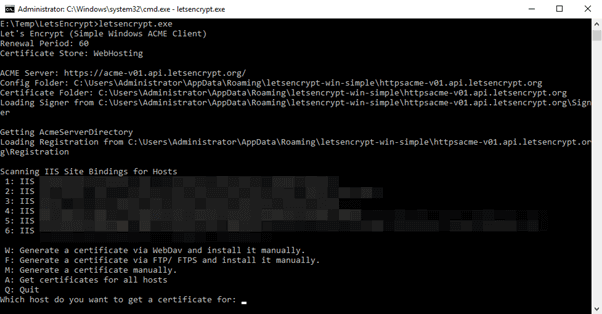
You'll be prompted to select which website you want to get a certificate for. Select the appropriate number (or all). After a few seconds, you may see this red error message indicating that something went wrong:
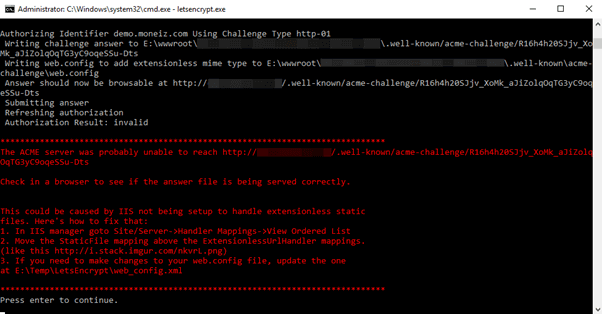
To issue a certificate, Let's Encrypt verifies that you own the domain by requesting a specific file from your server. In this case, the file is not accessible (status 404). Here is what happened.
IIS receives the request and finds the associated website. It then runs handlers in order until one sends a response. The ASP.NET Core handler is the first to process the request.
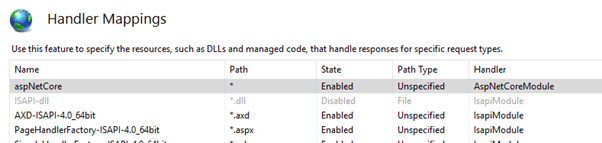
The challenge file lives under .well-known/..., but by default ASP.NET Core only serves files from the wwwroot folder, so a 404 response is returned. Because ASP.NET Core handled the request, the IIS Static File handler is never reached.
As a workaround, you could move the "StaticFile" handler up in priority, but that may break your website. A better solution is to configure your ASP.NET Core application to serve files from the .well-known directory by registering an additional static file provider:
C#
public class Startup
{
    public void Configure(IApplicationBuilder app, IHostingEnvironment env)
    {
        app.UseStaticFiles(); // wwwroot
        app.UseStaticFiles(new StaticFileOptions
        {
            FileProvider = new PhysicalFileProvider(Path.Combine(Directory.GetCurrentDirectory(), @".well-known")),
            RequestPath = new PathString("/.well-known"),
            ServeUnknownFileTypes = true // serve extensionless file
        });

        app.UseMvc();
    }
}
Now, you can execute LetsEncrypt.exe and ask for a certificate:

#Additional steps
By default, Let's Encrypt generates certificates with a key length of 2048 bits. You can increase it to 4096 (key length recommendations) by modifying the configuration file letsencrypt.exe.config:
XML
<setting name="RSAKeyBits" serializeAs="String">
  <value>4096</value>
</setting>
Also, it is strongly recommended to enable HSTS (HTTP Strict Transport Security) to ensure all requests use the HTTPS protocol.
Do you have a question or a suggestion about this post? Contact me!
