Understanding where a dependency comes from can be tedious, especially in large projects with many dependencies. Recently, .NET introduced a new tool, dotnet nuget why, to help you understand why a package is installed in your project. However, there is a better approach, and it doesn't require a recent SDK.
dotnet nuget why can explain why a package is included in your project:
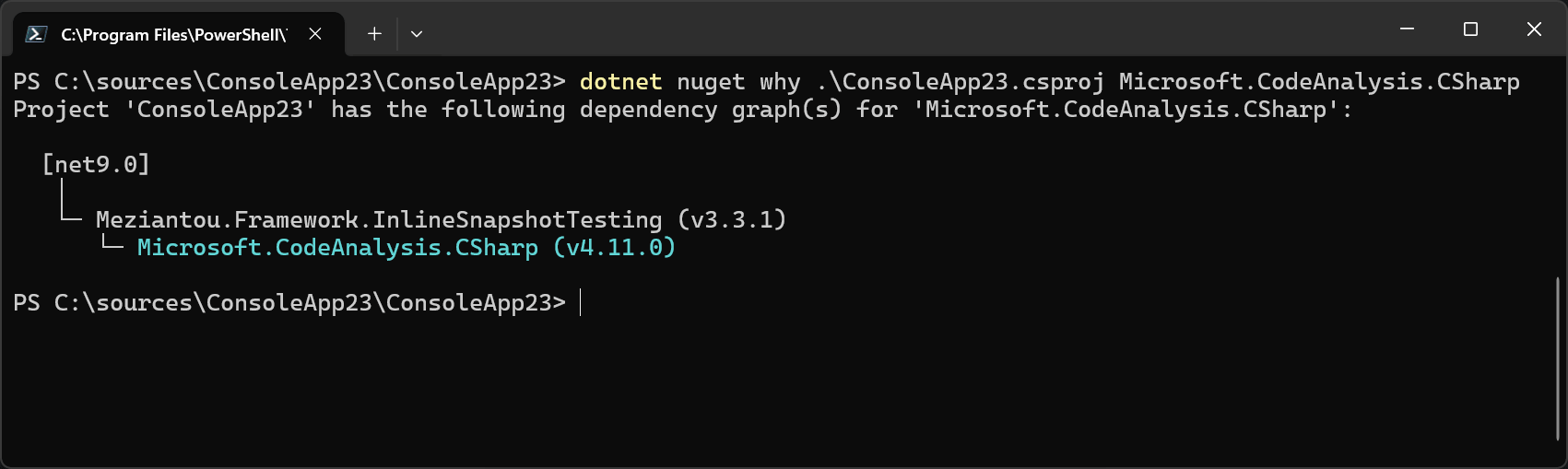
However, it only works with the latest SDK and only accepts package names. What if you want to know which package provides a specific DLL that appears in the build output?
When you restore packages, NuGet writes a file called project.assets.json in the obj folder. This file contains all the information about the packages used in the project, and you can use it to find out which package provides a specific DLL. However, it is a JSON file that can grow very large. A better approach is to build the project with the binary logger, which produces a .binlog file you can explore with MSBuild Structured Log Viewer.
The binlog includes the project.assets.json file, and MSBuild Structured Log Viewer provides a way to query its content.
First, you need to build the project using the binary logger:
Shell
dotnet build /bl
Then, you can open the .binlog file using MSBuild Structured Log Viewer and search for the NuGet package or file you are interested in:
$nuget project(.csproj) analyzers.dll
 MSBuild Structured Log Viewer - Search NuGet packages and files
The search syntax is powerful. Read more at MSBuildStructuredLog Wiki - Search Syntax. In short, you can search by package name, package files, or package version.
Do you have a question or a suggestion about this post? Contact me!
