ASP.NET Web API is a framework for building HTTP web services. Securing these services is a common requirement, and there are many ways to do it. In this article, we will implement HTTP Basic Authentication (RFC 2617).
#HTTP Basic Authentication
To authenticate someone, there are three methods:
- What you know, for example a username/password pair
- What you have, for example a smart card
- What you are, for example iris recognition
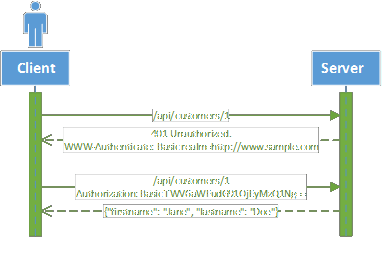
The basic authentication method uses a username and password, making it the first type of authentication. Its operation is straightforward:
When the user tries to access the resource without being authenticated, the server returns status 401 (Unauthorized) and the following header:
WWW-Authenticate: Basic realm = "http://www.sample.com"
The client knows it must authenticate using the Basic method and re-sends the same request with the following header:
Authorization: Basic TWV6aWFudG91OjEyMzQ1Ng==
TWV6aWFudG91OjEyMzQ1Ng== is the username followed by : and the password, all Base64-encoded. The original value is Meziantou:123456. The server can then authenticate the client. This header must be sent with every request.
#Web API Pipeline
ASP.NET Web API uses a pipeline to process requests. It is built around a series of DelegatingHandler instances. These handlers process incoming requests in sequence and also handle outgoing responses. A handler can either pass the request to the next handler or return a response directly to the previous handler, stopping further progress in the pipeline.
A handler can, for example, perform the following operations:
- Read and modify request headers
- Add headers to the response
- Authenticate the user
- Validate a request before it reaches the controller
- Trace and log requests and responses
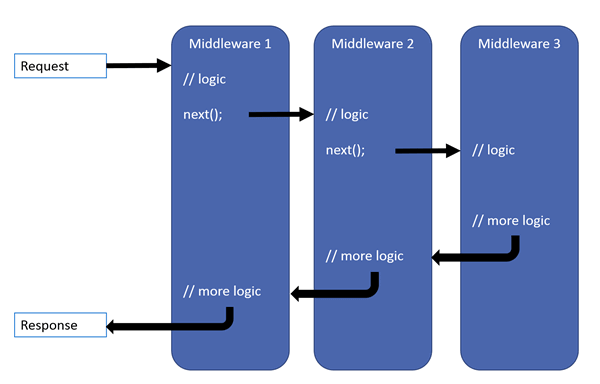
You will find a more complete diagram on the official site: http://www.asp.net/posters/web-api/ASP.NET-Web-API-Poster.pdf
DelegatingHandler can integrate into the pipeline at 2 levels:
- Globally to the API: they intercept all messages
- By route: they only intercept the messages intended for the route with which they are associated
#Implementation
We will create a DelegatingHandler that:
- On incoming requests, tries to authenticate the user if the Authorization header is present
- On outgoing responses, adds the
WWW-Authenticate header if the status code is 401 (Unauthorized)
C#
public abstract class BasicAuthMessageHandler : DelegatingHandler
{
    private const string BasicAuthResponseHeader = "WWW-Authenticate";
    private const string BasicAuthResponseHeaderValue = "Basic Realm=\"{0}\"";

    protected BasicAuthMessageHandler()
    {
    }

    protected BasicAuthMessageHandler(HttpConfiguration httpConfiguration)
    {
        InnerHandler = new HttpControllerDispatcher(httpConfiguration);
    }

    protected virtual string GetRealm(HttpRequestMessage message)
    {
        return message.RequestUri.Host;
    }

    protected override Task<HttpResponseMessage> SendAsync(HttpRequestMessage request, CancellationToken cancellationToken)
    {
        // Process request
        AuthenticationHeaderValue authValue = request.Headers.Authorization;
        if (authValue != null && !String.IsNullOrWhiteSpace(authValue.Parameter) &&
            string.Equals(authValue.Scheme, "basic", StringComparison.OrdinalIgnoreCase))
        {
            // Try to authenticate user
            IPrincipal principal = ValidateHeader(authValue.Parameter);
            if (principal != null)
            {
                request.GetRequestContext().Principal = principal;
            }
        }

        return base.SendAsync(request, cancellationToken) // Send message to the InnerHandler
            .ContinueWith(task =>
            {
                // Process response
                var response = task.Result;
                if (response.StatusCode == HttpStatusCode.Unauthorized &&
                    !response.Headers.Contains(BasicAuthResponseHeader))
                {
                    response.Headers.Add(BasicAuthResponseHeader,
                    string.Format(BasicAuthResponseHeaderValue, GetRealm(request)));
                }

                return response;
            }, cancellationToken);
    }

    private IPrincipal ValidateHeader(string authHeader)
    {
        // Decode the authentication header & split it
        var fromBase64String = Convert.FromBase64String(authHeader);
        var lp = Encoding.Default.GetString(fromBase64String);
        if (string.IsNullOrWhiteSpace(lp))
            return null;

        string login;
        string password;
        int pos = lp.IndexOf(':');
        if (pos < 0)
        {
            login = lp;
            password = string.Empty;
        }
        else
        {
            login = lp.Substring(0, pos).Trim();
            password = lp.Substring(pos + 1).Trim();
        }

        return ValidateUser(login, password);
    }

    protected abstract IPrincipal ValidateUser(string userName, string password);
}
The ValidateUser method is abstract and must be implemented according to your needs:
C#
public class SampleBasicAuthMessageHandler : BasicAuthMessageHandler
{
    protected override IPrincipal ValidateUser(string userName, string password)
    {
    if (string.Equals(userName, "Meziantou", StringComparison.OrdinalIgnoreCase) && password == "123456")
        return new GenericPrincipal(new GenericIdentity(userName, "Basic"), new string[0]);

    return null;
    }
}
All that remains is to declare the handler:
C#
public void Configuration(IAppBuilder app)
{
    HttpConfiguration config = new HttpConfiguration();
    config.Routes.MapHttpRoute(
        name: "DefaultApi",
        routeTemplate: "api/{controller}/{id}",
        defaults: new { id = RouteParameter.Optional }
    );

    config.MessageHandlers.Add(new SampleBasicAuthMessageHandler());
    app.UseWebApi(config);
}
The complete example is available on GitHub: Web API - Basic Authentication.
warn: With this type of authentication, it is strongly recommended to use HTTPS to protect credentials, which would otherwise be transmitted in plain text over the network.
Do you have a question or a suggestion about this post? Contact me!
