This post is part of the series 'Microsoft SQL Server 2016'. Be sure to check out the rest of the blog posts of the series!
The final version of SQL Server 2016 was released recently, so it's time to look at some of its new features. Today we will look at Dynamic Data Masking. This feature, already available on SQL Azure for some time, is now available in SQL Server.
Some tables may need to store sensitive information, or at least information that we do not want all users to access: bank card numbers, email addresses, etc. Currently, to protect this data, you can create views or stored procedures that mask the desired columns, but this takes time and is difficult to configure based on the logged-in user.
Dynamic Data Masking addresses this need by allowing you to hide the contents of certain columns based on the connected user's permissions. Before seeing how this is configured, here is the result of the same query run by two different users with different permissions:
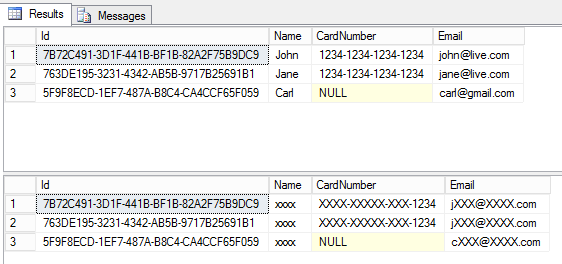
As you can see, the idea is not to remove columns but to anonymize their content. For example, a telephone company may ask for the last few digits of your bank card to verify ownership, without having access to the full number. A user with sufficient rights, on the other hand, can see the unmasked data.
#Setting up Mask
Before using this feature, you need to activate it:
SQL
DBCC TRACEON(209,219,-1)
Let's create the table:
SQL
CREATE TABLE [dbo].[Customer](
    [Id] [uniqueidentifier] NOT NULL,
    [Name] [nvarchar](100) NOT NULL,
    [CardNumber] [nchar](20) NULL,
    [Email] [nvarchar](255) NULL
)
To enable data masking, you must change the definition of the desired columns:
SQL
ALTER TABLE Customer
ALTER COLUMN Name ADD MASKED WITH (FUNCTION = 'default()')
The replacement of the data is defined with FUNCTION = 'default()'. 3 functions are available:
default(): replace the value with "XXXX" for a character string or its default value (0 for a number, 1/1/0001 for a date, etc.)email(): keeps the first letter of the email as well as the extension of the domainpartial(prefix_length, 'XXX', suffix_length): replaces the text with the first N characters of the original string, followed by a fixed string ('XXX' in the example), followed by the last N characters of the original string
For example, to mask a credit card number, use the following:
SQL
ALTER TABLE Customer
ALTER COLUMN CardNumber ADD MASKED WITH (FUNCTION = 'partial(0, "XXXX-XXXX-XXXX-", 4)')
-- XXXX-XXXX-XXXX-1234
For a phone number you can keep the first 4 digits:
SQL
ALTER TABLE Customer
ALTER COLUMN PhoneNumber ADD MASKED WITH (FUNCTION = 'partial(4, "000000", 0)')
-- 0175000000
For the email address we use the function dedicated to this use:
SQL
ALTER TABLE Customer
ALTER COLUMN Email ADD MASKED WITH (FUNCTION = 'email()')
-- cXXX@XXXX.com
#Set permissions
If you execute SELECT * FROM Customer, you will most likely not see any masking applied, because your account probably has the UNMASK permission. Let's create a new user without this permission and run the query under that identity:
SQL
CREATE USER TestUser WITHOUT LOGIN;
GRANT SELECT ON Customer TO TestUser;

EXECUTE AS USER = 'TestUser';
SELECT * FROM Customer;
REVERT;

The data is hidden. Now add the UNMASK permission to the user and look at the difference:
SQL
GRANT UNMASK TO TestUser;

EXECUTE AS USER = 'TestUser';
SELECT * FROM Customer;
REVERT;

This time the user can see the unmasked data.
#Conclusion
This new feature makes it easy to improve data privacy without changing the actual content of the database. Based on the user's permissions, SQL Server automatically anonymizes the data according to the defined masking rules.
Do you have a question or a suggestion about this post? Contact me!
